Listing a crochet pattern on Etsy was the part I hated, so NodeStitch does it now
NodeStitch, my pattern design software, can now make your Etsy listing for you. Open your finished pattern, click Download and then Listing details, and NodeStitch reads your pattern and fills in the hook size, yarn, yarn weight, finished size, a description and tags. Pick your listing photos, type a price, and click Send to Etsy as a draft. The listing shows up in your Etsy shop with your photos and the PDF attached, as a draft, so nothing goes live until you publish it.
It works for crochet, knitting and cross stitch patterns, and for charts sold on their own.
Finishing the pattern was supposed to be the hard part
After finishing a pattern, which is already a lot of work, I still had to list it. And listing was the part I really hated.
Here’s what it looked like for me every time:
- Open an old listing and copy and paste from it, because I didn’t want to write the whole description from scratch.
- Go through it line by line to make sure I didn’t miss something I copied and forgot to change. That has happened to me before.
- Select all the photos again and put them in order.
- Come up with tags. Thirteen of them. Every single time.
- Fill in every field Etsy asks for, most of which my pattern already says.
None of it is hard. It’s just tedious, and it comes right at the end, when I’m tired of looking at the pattern and want it out in the world.
It kept some of my patterns off Ravelry
To be honest, this is the reason not all of my patterns are on Ravelry. Ravelry asks a lot of questions when you add a pattern, and after everything it took to finish the pattern, I just didn’t want to go through all of them again. So some patterns stayed in my Etsy shop and never made it there.
That’s when I knew this wasn’t a small annoyance. Listing had literally kept me from posting my own patterns. So it was something I was really passionate about solving, for me and for every designer who has a finished pattern sitting in a folder because listing it is one more chore.
Sending to Ravelry isn’t connected yet. It’s something I’m working on, and I’ll write about it when it’s ready.
How do I list a crochet, knitting or cross stitch pattern on Etsy?
1. Link your Etsy shop once
Go to My Account and find Connected shops. Click Link Etsy, sign in to Etsy if it asks, and click Allow Access. You only do this once. After that it says which shop is linked, and you can click Unlink at any time to stop NodeStitch reaching your shop.
2. NodeStitch reads your pattern
Open your pattern, click Download, then Listing details. NodeStitch reads the first three pages of your pattern, where the materials usually are, and fills in what it finds. Each field it filled says Found in your pattern, so you can see exactly what came from your own words.
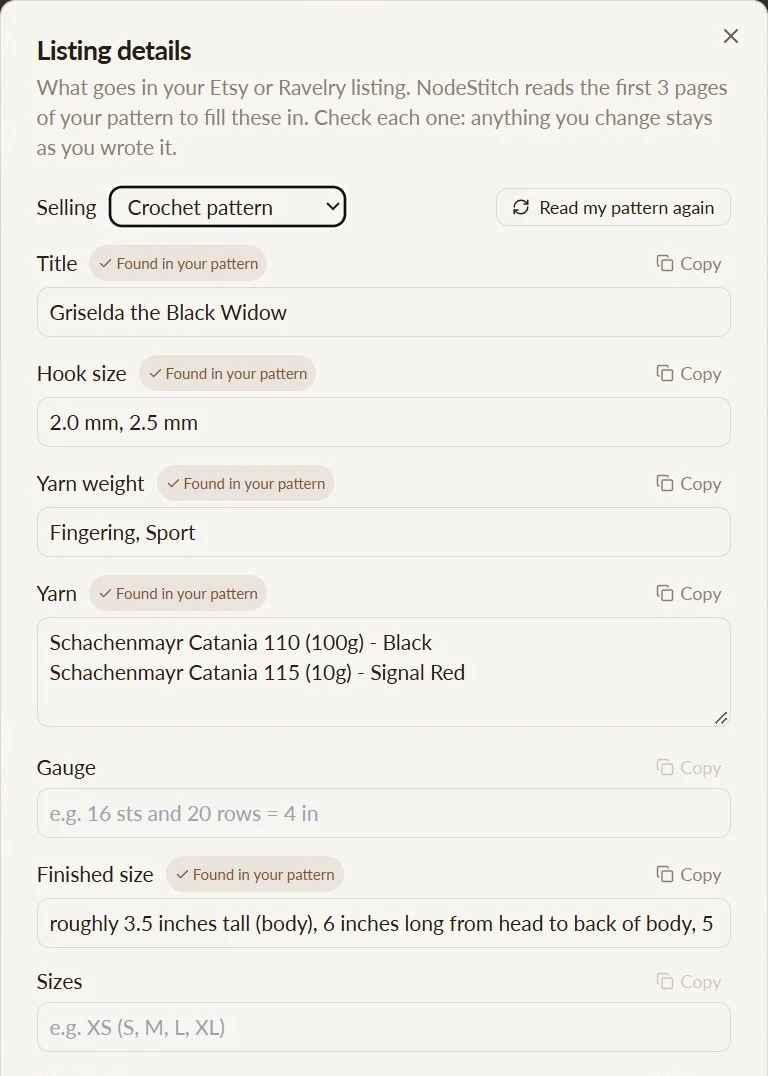
That’s my Griselda the Black Widow pattern. I didn’t type any of those fields. The hook sizes, both yarns with their amounts and the finished size all came out of the pattern itself. It reads your words as written, so check every field, and anything it couldn’t find stays empty for you to fill in. Gauge is empty there because the pattern doesn’t give one.
For a cross stitch pattern it fills in the fabric, every floss on your chart, and the finished size worked out from the chart.
3. Photos, price and Etsy tags
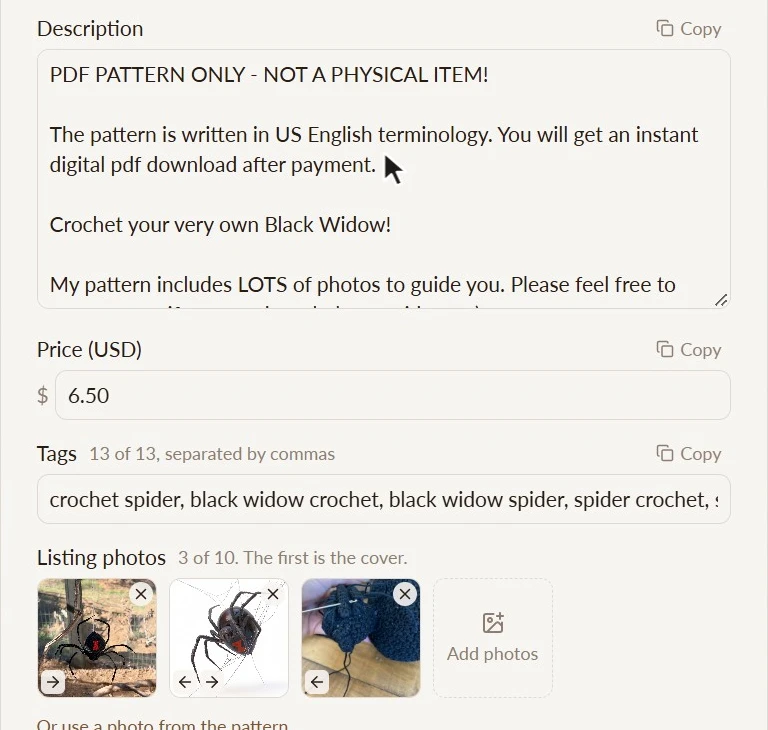
Add your listing photos, up to 10, or pick photos straight from your pattern. The first one is the cover. Type your price. NodeStitch suggests up to 13 tags from the pattern, and you can change any of them.
Anything you type stays yours. If you click Read my pattern again, it only fills in the fields you haven’t changed.
4. Write it like my listings
My Etsy listings all start the same way, with “PDF PATTERN ONLY - NOT A PHYSICAL ITEM!” and a line saying the pattern is written in US English terms. A plain description doesn’t sound like my shop.
So in Write it like my listings, you pick one to three of your own Etsy listings, and NodeStitch rewrites the title, description and tags in the same style, using only this pattern’s details.
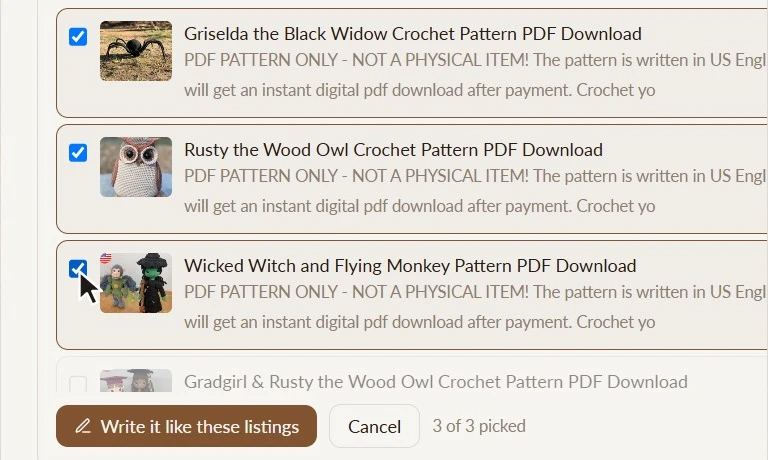
It’s set up to use only this pattern’s details, never your other listings’ yarn, sizes or hook. Anything it can’t find in this pattern is meant to be left out rather than guessed, which is exactly the copy and paste mistake I used to make. Read it over before you send it. If you don’t like what it wrote, Put back what was there brings the old text back.
5. Send it to Etsy as a draft
Click Send to Etsy as a draft. NodeStitch makes the compressed PDF and creates a draft digital download listing in your Etsy shop with your title, description, tags, price, photos and the PDF.
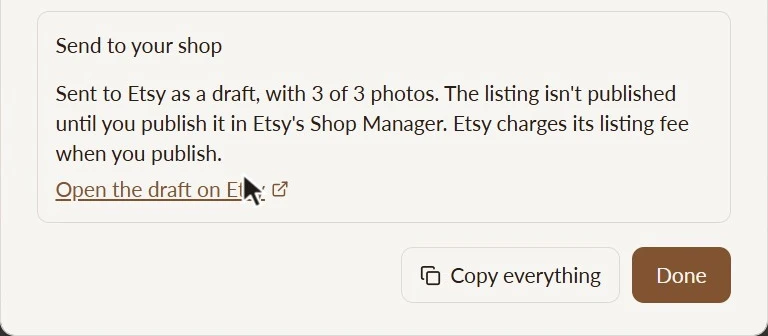
Click Open the draft on Etsy, check it in Shop Manager, and publish when you’re ready. Nothing is published or put on sale until you do it, and Etsy charges its listing fee only when you publish. NodeStitch fills in the category (Patterns), “I did” for who made it, and “A supply or tool to make things”, and you can change any of them in the draft.
Etsy said yes
Connecting to Etsy like this isn’t something you just switch on. Etsy reviews apps that create listings in other people’s shops, and until it approves one, only a handful of shops can link to it. In November 2026 Etsy approved NodeStitch for full access, so there’s no limit on how many designers can link their shops now.
That was a really big deal for me. Getting through that review felt like Etsy saying NodeStitch was worth giving that access to. It’s an approval of access, not an endorsement: NodeStitch is my software, not Etsy’s.
Do you need Pro to send a pattern to Etsy?
| Free account | Pro | |
|---|---|---|
| Listing details (reads your pattern, copy any field) | Yes | Yes |
| Link your Etsy shop | Yes | Yes |
| Write it like my listings | With your free tries | Yes |
| Send to Etsy as a draft | One pattern, to try it | Yes |
Pro is $9.99 a month or $99 a year. More in What NodeStitch Pro gets you.
If you don’t sell on Etsy, Listing details still saves you the retyping: click Copy beside any field, or Copy everything, and paste it wherever you sell. Your listing details are saved with your pattern, so they’re there the next time you open it.
The full steps are in the help article, Listing details: get your pattern ready for Etsy or Ravelry.
If you’re still deciding on software, I compared the options in the best pattern writing program for crochet and knitting.
The term ‘Etsy’ is a trademark of Etsy, Inc. NodeStitch uses Etsy’s API, but is not endorsed or certified by Etsy.
Etsy listing questions
Does NodeStitch publish my Etsy listing?
No. It sends a draft, and nothing goes live until you publish it in Etsy’s Shop Manager.
Does sending a draft cost anything on Etsy?
Etsy charges its listing fee only when you publish.
Can NodeStitch suggest Etsy tags for a crochet pattern?
Yes. It suggests up to 13 tags from your pattern, and you can change any of them.
Does it work for knitting and cross stitch patterns?
Yes, and for charts sold on their own. For cross stitch it fills in the fabric, every floss on your chart and the finished size.
Can I use it if I don’t sell on Etsy?
Yes. Click Copy beside any field, or Copy everything, and paste it wherever you sell.
Does it send to Ravelry?
Not yet. I’m working on it.
Can I stop NodeStitch reaching my Etsy shop?
Yes. Click Unlink under Connected shops in My Account.