Stitch Fiddle vs NodeStitch: which chart maker fits a pattern designer?
If all you need is a chart, Stitch Fiddle is cheaper, covers far more crafts and works on your phone. If you’re writing a knitting or crochet pattern to sell, NodeStitch puts the chart on the same page as your written rows, photos and layout, and exports the whole pattern as one PDF. Every chart editing tool in NodeStitch is free. I built NodeStitch, so keep that in mind as you read.
Why I’m comparing my own app to Stitch Fiddle
Stitch Fiddle is probably the most popular chart maker for knitting and crochet. If you’re looking at NodeStitch’s chart editor, it’s almost certainly the thing you’re comparing it to, so I’d rather do that comparison out loud than pretend it doesn’t exist.
I’ve never used Stitch Fiddle for my own patterns. Everything I say about it here comes from a walkthrough of its free account, its help pages and its pricing page in October 2026. Where it does something better, I say so. Prices and features change, so check both sites before you decide.
Updated October 17, 2026: added the results of running the same charts through both tools, US and UK terms, symbol standards, yarn colors and gauge, and a longer list of where Stitch Fiddle is ahead.
The short version
| Stitch Fiddle | NodeStitch | |
|---|---|---|
| What it is | A chart maker | A pattern editor with a chart maker built in |
| Crafts | Knitting, crochet, cross stitch, diamond painting, fuse beads, latch hook, quilting, pixel art and more | Knitting and crochet |
| Knitting and crochet chart types | Colorwork, lace, cables, brioche, mosaic, punch card, C2C, filet, overlay mosaic, Tunisian, free form and general symbol charts, all free | The same list, 14 types in all. Colorwork, lace, cables, symbol charts, filet and free form diagrams are free; C2C, brioche, both mosaics, Tunisian and punch cards are Pro |
| Runs on | Any browser, including phones and tablets | A desktop browser; charts also work on a tablet |
| Paid plan | $5.50 for a month, or $33 a year, paid once with no auto renew | $9.99 per month, or $99 per year |
| Free chart size | 300 x 300 | 300 x 300 |
| Paid chart size | 1,000 x 1,000 | 1,000 x 1,000 |
| Free charts | 15 | Unlimited |
| Fill, mirror, rotate, stamp, crop | Premium | Free |
| Written instructions from a chart | Premium | First 3 rows free, every row on Pro |
| US or UK crochet terms | US only | Either, in the legend and the written rows |
| Error check on rows | Premium, for knitting | Free count check, knitting and crochet |
| Symbol standards | Its own symbol library | Craft Yarn Council symbols for knitting and crochet, and Japanese (JIS) knitting symbols, all free |
| Yarn colors | A few yarn palettes when you create a chart | 85 brands and over 14,000 colorways, mixable on one chart, free |
| Photo to chart | Free; custom colors for it on Premium | Free and unlimited, runs in your browser, can match a yarn line |
| Following a chart as you work | Free progress tracker, a row counter and stitch highlighter | Free follow mode, current row outlined, done rows dimmed, place saved |
| Custom stitches | Free | Pro |
| Brioche, C2C, mosaic, Tunisian, punch card | Free | Pro |
| Download a chart on its own | PNG and a printable PDF free, with a Stitch Fiddle mention; Word, Excel, vector formats and no mention on Premium | PNG, SVG or PDF on Pro |
| Chart in the pattern’s PDF | Not applicable, the pattern is made elsewhere | Free, with a small NodeStitch mark; no mark on Pro |
| Share a chart | View only link, or invite people by email to view or edit | View only link to one chart |
| The rest of the pattern | Done somewhere else | Round numbering, photo numbering, tables, layout and PDF in the same file |
Where Stitch Fiddle is better
I’ll start here, because these are real and you should know them.
- It’s cheaper. Premium is $5.50 for a month or $33 for a year, and it’s a one time payment that doesn’t renew on its own. NodeStitch Pro is $9.99 per month or $99 per year.
- It covers far more crafts. Cross stitch with DMC, Anchor and Madeira floss, diamond painting, fuse beads, latch hook, quilting and pixel art. NodeStitch only does knitting and crochet.
- It works on your phone. Stitch Fiddle runs in any modern browser, phones included. NodeStitch is built for a desktop browser. Its chart editor also works on a tablet, but there’s no phone version.
- More chart types are free. Every craft and chart type is on its free plan. In NodeStitch, corner to corner, brioche, mosaic, Tunisian and punch card charts are Pro.
- Custom stitches are free. You can add your own stitch on Stitch Fiddle’s free plan. In NodeStitch that’s Pro.
- You can work on a chart with someone else. Stitch Fiddle lets you invite people by email to view or edit a chart. NodeStitch only shares a chart as a view only link.
- You can download a chart on its own for free. Stitch Fiddle’s free plan downloads a chart as a PNG or a printable PDF, with a Stitch Fiddle mention on it, and Premium adds Word, Excel and vector formats like SVG and EPS, and drops the mention. NodeStitch exports a chart on its own as a PNG (you pick the cell size and whether the legend goes underneath), an SVG that opens in Illustrator, Inkscape or Affinity, or a PDF that splits a large chart across pages, but only on Pro. A chart on your page goes into the pattern’s PDF on both plans.
- Backups. Stitch Fiddle keeps previous versions of a chart for 7 days on the free plan, and you can restore one. NodeStitch saves version history on both plans, but only Pro can open it.
- More ways to start a chart. Besides a picture, Stitch Fiddle can start from a QR code or a .oxs file from a cross stitch program. NodeStitch starts from an empty grid or a picture.
- A more detailed progress tracker. Stitch Fiddle can track stitch by stitch or in groups as well as by row, with a choice of what gets darkened and a few border styles. NodeStitch’s follow mode works one row at a time.
- More ways to format written rows. Row label templates, separators, totals per color and a color blocks view. NodeStitch has fewer switches.
- A bigger knitting stitch library. Twined knitting, knit and purl a stitch up to 12 rows below, and a longer list of Estonian gathered stitches are all in Stitch Fiddle. NodeStitch has the Craft Yarn Council set, JIS, brioche, Estonian nupps, beads and cables up to 12 stitches wide, but no twined knitting or stitches worked rows below yet, and a shorter Estonian list.
If you chart for cross stitch, chart on your phone, or just want the cheapest decent chart maker, Stitch Fiddle is the better pick.
Where NodeStitch is better
The chart lives in the pattern
This is the whole reason I built a chart editor at all. In Stitch Fiddle the chart is the finished thing. You download it as an image and then build the pattern somewhere else, in Canva or Word or wherever you write.
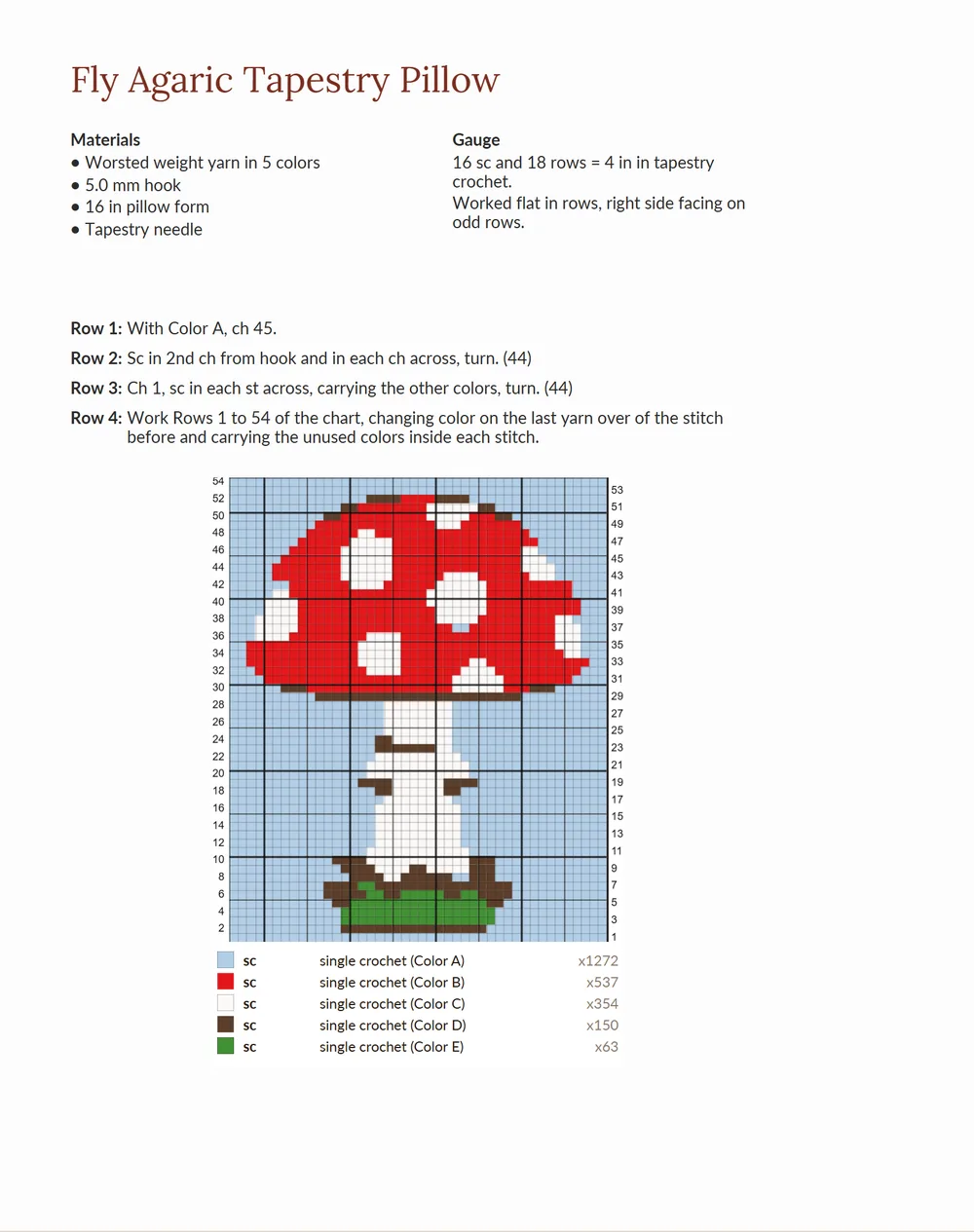
In NodeStitch the chart sits on the pattern page, next to your written rounds, photos, tables and materials list. You open it in the chart editor right from the page. There’s nothing to download and paste back in, and no second copy of the chart to keep in sync when you change a stitch.
Every editing tool is free
Fill, mirror, rotate, stamp, crop, copy, cut and paste are all on NodeStitch’s free plan. To move part of a chart, you cut it and paste or stamp it where you want it. On Stitch Fiddle, mirror, rotate, fill, swap colors, stamp, crop and dragging parts of a chart around are Premium. On a big colorwork chart, not having fill means clicking every cell.
Written rows you can see before you pay
Both tools turn a chart into written instructions by fixed rules, not AI. On Stitch Fiddle that’s Premium only. On NodeStitch a free account sees the first 3 rows, so you can check the wording on your own chart before deciding, and Pro sees every row.
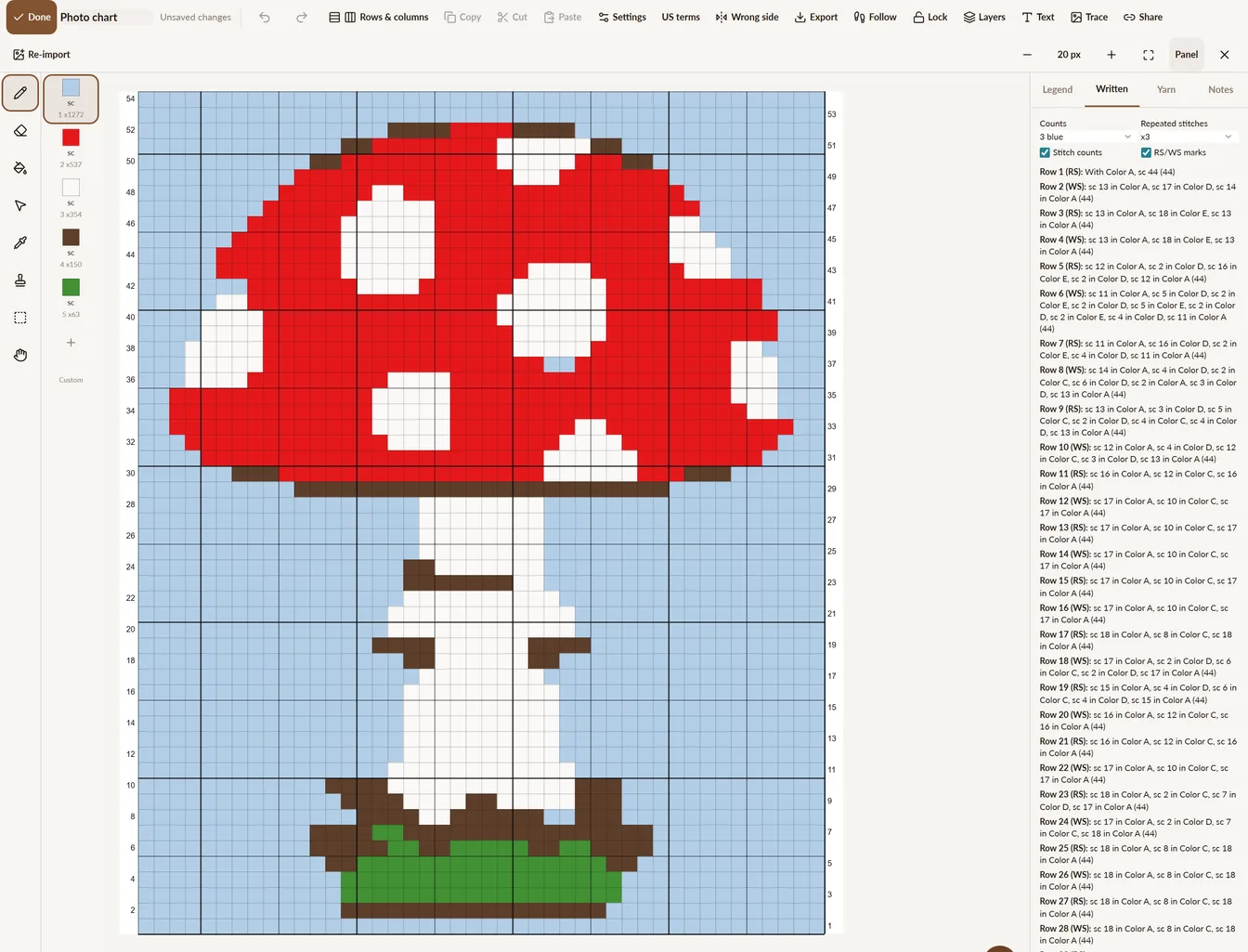
On crochet colorwork, Stitch Fiddle’s rows count colors, like 2x red, blue. NodeStitch names the stitch as well:
sc 4 in Color A, sc 1 in Color B
With a yarn picked, the color names come from the yarn, so a row can say Dark Heather instead of Color A.
Every row ends with its stitch count in brackets, so a tester can check a row without counting cells. A repeat box with a count is written as *...; rep from *, and if you draw the copies out next to the box anyway, NodeStitch still writes them once as a repeat.
On Pro, Add to pattern puts those rows into your written pattern, each one linked back to its row on the chart.
US or UK terms
If you write in UK terms, this one matters. Stitch Fiddle’s crochet stitches are US only. In NodeStitch the legend and the written rows switch between US and UK terms, so a US sc is written as a UK dc and you don’t have to translate every row by hand.
Standard symbols
NodeStitch draws knitting charts with the Craft Yarn Council symbols, or the Japanese (JIS) set if that’s what you and your knitters read, and crochet charts with the standard crochet symbols. The legend credits the standard, and none of it is behind Pro.
Yarn you can actually buy
A chart color in NodeStitch can be a real yarn colorway: 85 brands, 268 yarn lines and over 14,000 colorways, from temperature-blanket.com’s Yarn Colorways. One chart can mix brands, and My yarns saves your own. The legend then reads like a shopping list, “Color A: Bernat Super Value, Dark Heather”. Screen colors are approximate, so buy by color name. All of this is free.
Checks that are free
NodeStitch’s count check flags a row whose stitch count doesn’t match the row below, on the free plan, for knitting and crochet. It’s a hint, not a guarantee. Stitch Fiddle’s automatic chart check is Premium, and its help pages describe it for knitting.
Gauge you can see
You set the gauge when you make the chart, and the cells take its shape, so a knitting chart at 18 stitches and 24 rows draws wider than it is tall. The finished size shows next to it and you can edit either one. Corner to corner charts count gauge in tiles, the way you’d count them in a C2C swatch.
If you’d rather draw on a square grid, tick Draw cells square and the gauge still sets the finished size. Stitch Fiddle has the same choice. Photo to chart uses your gauge too, so a square photo 40 stitches wide at 18 stitches and 24 rows gets 53 rows instead of coming out squashed.
Photo to chart without paying
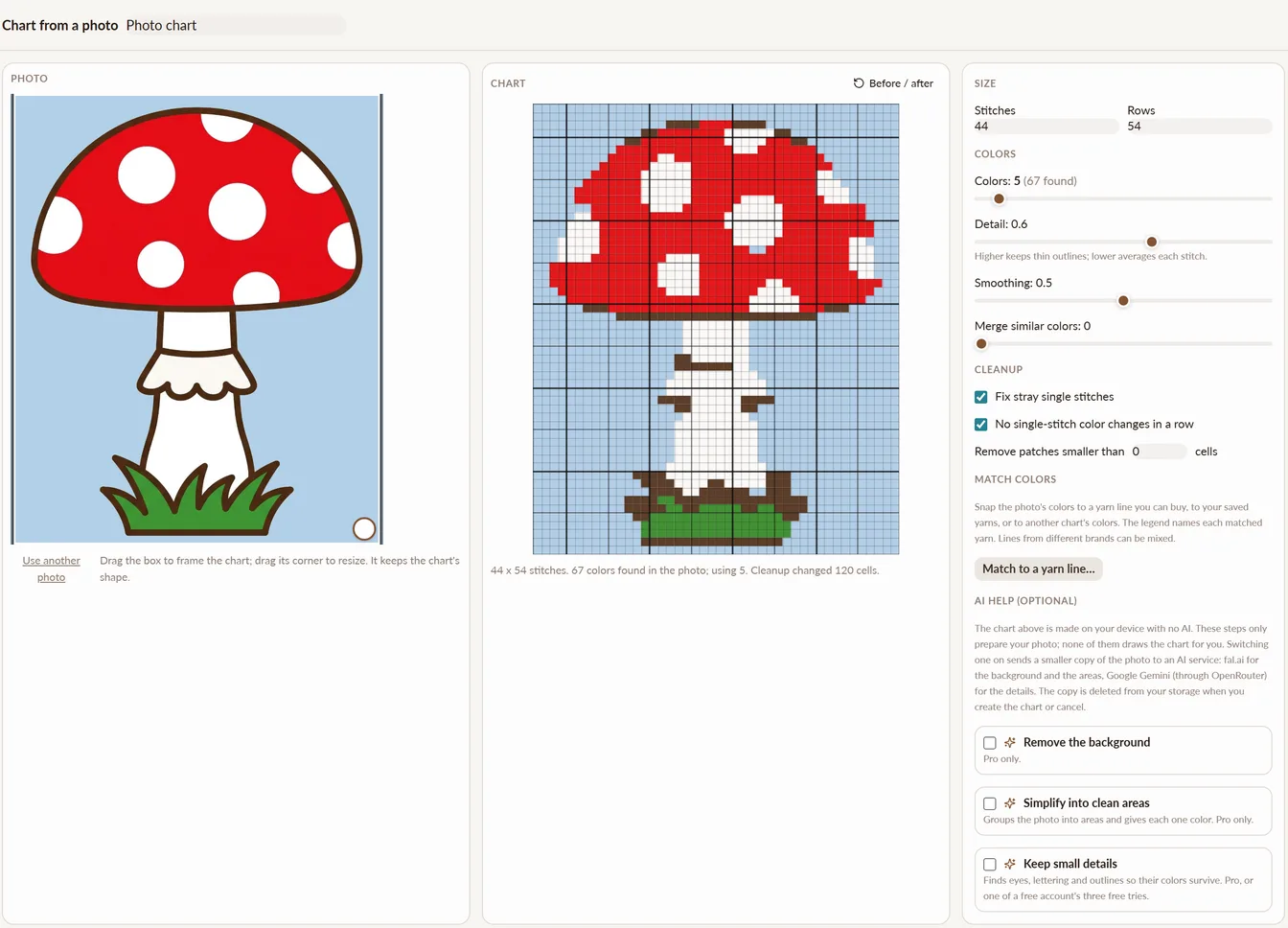
Both tools turn a picture into a chart on the free plan. NodeStitch’s runs in your browser, so the photo isn’t uploaded and there’s no AI in it unless you switch on one of its optional AI steps (Pro, though a free account gets 3 tries of “keep small details”). You can do it as often as you like. Every color it merges is listed so you can undo the merge, and it can snap the chart to a real yarn line so the legend names each colorway. On Stitch Fiddle, choosing your own colors for a picture chart is Premium.
If the picture is already pixel art, like a graphgan you drew in a paint program or a cross stitch pattern saved as a PNG, NodeStitch notices and offers Exact import, so every cell becomes one stitch and the colors stay as they are. Stitch Fiddle can do this too, from a PNG where every pixel is one stitch.
Here’s a simple mushroom drawing turned into a 44 by 54 stitch chart in 5 colors:
Everything else a pattern needs
This is where the comparison stops being chart vs chart. Stitch Fiddle makes the chart. NodeStitch also does the parts of a pattern that ate my time before I built it:
- Numbers your rounds and rows as you type
- Numbers your photos, and renumbers them when you add one in the middle
- Checks your stitch counts with Pattern Review (Pro, with 3 free tries)
- Lays out the pages, with your fonts, colors and tables
- Exports the whole pattern, chart included, as one PDF
The free plan exports that PDF with a small NodeStitch mark in the corner. Pro removes it.
Same charts, both tools
On October 16 the same two charts went through both tools.
A lace panel, 21 stitches and 16 rows, worked flat with an 8 stitch repeat. Both tools wrote the same correct stitches on all 16 rows. The difference was the count at the end:
NodeStitch:     Row 5 (RS): k5, yo, sk2p, yo, k5, yo, sk2p, yo, k5 (21)
Stitch Fiddle:  Row 5 [RS]: k5, yo, sk2p, yo, k5, yo, sk2p, yo, k5
A 40 by 40 mushroom motif in four colors, made from an image. With the colors set to 12, NodeStitch matched all 40 rows. Stitch Fiddle got 35 of 40 right; it lost single dots on 5 rows. To be fair to Stitch Fiddle, NodeStitch’s default settings did worse: they kept only 3 colors and lost the brown outline. Photo to chart works best when you check the color count, in either tool.
A worked example: a colorwork beanie
Say you’re writing a stranded colorwork beanie with a 24 stitch repeat.
In Stitch Fiddle, you chart the motif, download it as a PNG, and place it in your pattern file in Canva or Word. You type the brim and crown rounds by hand. If you want the chart rows written out too, that’s Premium, and you copy the text across. When a tester finds a stitch that’s off, you fix the chart, download it again and replace the image.
In NodeStitch, you draw the motif in the chart editor, which opens right from the pattern page. The rounds you type for the brim and crown number themselves. The legend builds from the colors you actually used, and the count check flags a round that doesn’t add up. When a tester finds the same stitch, you fix it in the chart, and the chart in your PDF is the one you just fixed.
Neither of these is hard. One just has more places for the chart and the pattern to stop agreeing.
Is there a free alternative to Stitch Fiddle?
Yes, both have free plans that don’t expire. Stitch Fiddle’s free plan gives you 15 charts, 50 colors or symbols per chart and grids up to 300 x 300, with fill, mirror and written instructions on Premium. NodeStitch’s free plan gives you unlimited projects, charts up to 300 x 300, every drawing and editing tool, the first 3 written rows, and the full pattern editor with PDF export and 50 fonts (Pro gets all 201). The free PDF carries a small NodeStitch mark in the corner, the same way Stitch Fiddle’s free downloads carry a Stitch Fiddle mention. It doesn’t ask for a card.
Which one should you use?
- You chart for cross stitch, beads, latch hook or quilting. Stitch Fiddle. NodeStitch doesn’t do those crafts.
- You mostly chart on your phone. Stitch Fiddle.
- You want the cheapest paid chart maker. Stitch Fiddle, at $33 a year.
- You sell knitting or crochet patterns and the chart is one part of the PDF. NodeStitch, because the chart, the written rows and the layout are in one place.
- You write in UK terms. NodeStitch.
- You want fill, mirror and rotate without paying. NodeStitch.
- You want to see written rows from your chart before you pay. NodeStitch.
I’m obviously hoping you try mine. But if Stitch Fiddle is the right tool for what you make, use it.
If you want the full list of what NodeStitch’s chart editor does, what’s free and what isn’t, it’s all on one page here, and there’s a longer walkthrough in the stitch charts post. Everything NodeStitch does and doesn’t do is here. For other charting programs, I compared the rest here.