Brioche knitting chart symbols for fantasy and tuck stitches, worked a row at a time
NodeStitch is pattern design software with a knitting chart maker built in, and it charts fantasy and tuck brioche worked a row at a time: one yarn per row, turning every row. You draw on a plain knitting chart with 27 new brioche symbols, stack one square a row for tall tuck stitches, and the Written tab writes rows like “Row 2 (WS): sl1 wyib, k1, yf sl1+yo, k5, sl1 wyib (9)” with the stitch count at the end.
Not every brioche pattern is two color
NodeStitch already had a brioche chart type where each row is worked in two passes, one light and one dark. But a lot of published brioche, fantasy brioche and tuck stitches especially, is worked flat in one yarn a row and turned at the end of every row. Those patterns don’t fit a two pass chart, and they don’t fit the usual brk and brp either, because a single stitch can pick up two, three or four yarn overs over several rows before it’s finally knit.
So these are charted on a regular knitting chart now. Pick Knitting stitch symbols, open the stitch picker and go to its Brioche section.
I should say up front that I don’t knit. I crochet. These stitches were built from a brioche stitch dictionary I own, its abbreviation list and its symbol key, and then tested by charting several of its patterns and checking the written rows against the book. The workings in NodeStitch are in my own words, and the charts in this post are my own, not the book’s.
A “+” means one more yarn over on the same stitch
Fantasy brioche abbreviations look intimidating until you see the pattern. “sl1yof” slips a stitch with a yarn over and leaves the yarn in front. On the next row, “yf sl1+yo” slips that stitch again together with the yarn over it already carries, and adds another one. Each “+” is one more yarn over riding on the stitch. Then “brk+1” knits the stitch together with both yarn overs, 3 loops in all.
All of those loops are still one stitch. That’s the part that matters for stitch counts: a sl1yof doesn’t add a stitch, a yf sl1+yo doesn’t add one, and brk+1 doesn’t take any away. NodeStitch counts each of them as one stitch.
Tall stitches are one square a row, stacked
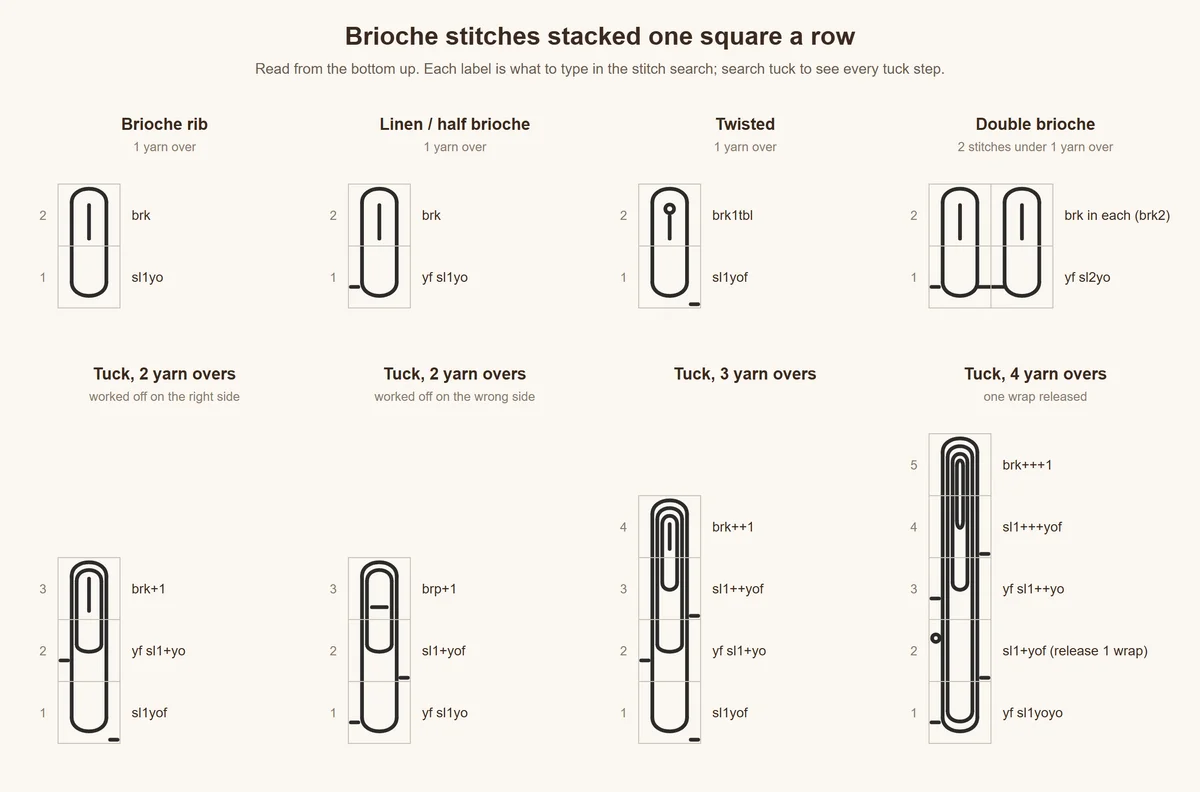
A tuck stitch that builds over three or four rows is drawn the way brioche books draw it: one square per row, in one column. sl1yof on the first row, yf sl1+yo above it, brk+1 on top. Each yarn over is one strand running up through the squares, so the column reads as one tall stitch. Plain brioche joins the same way: a brk on top of a sl1yo is drawn as one long loop across the two squares.
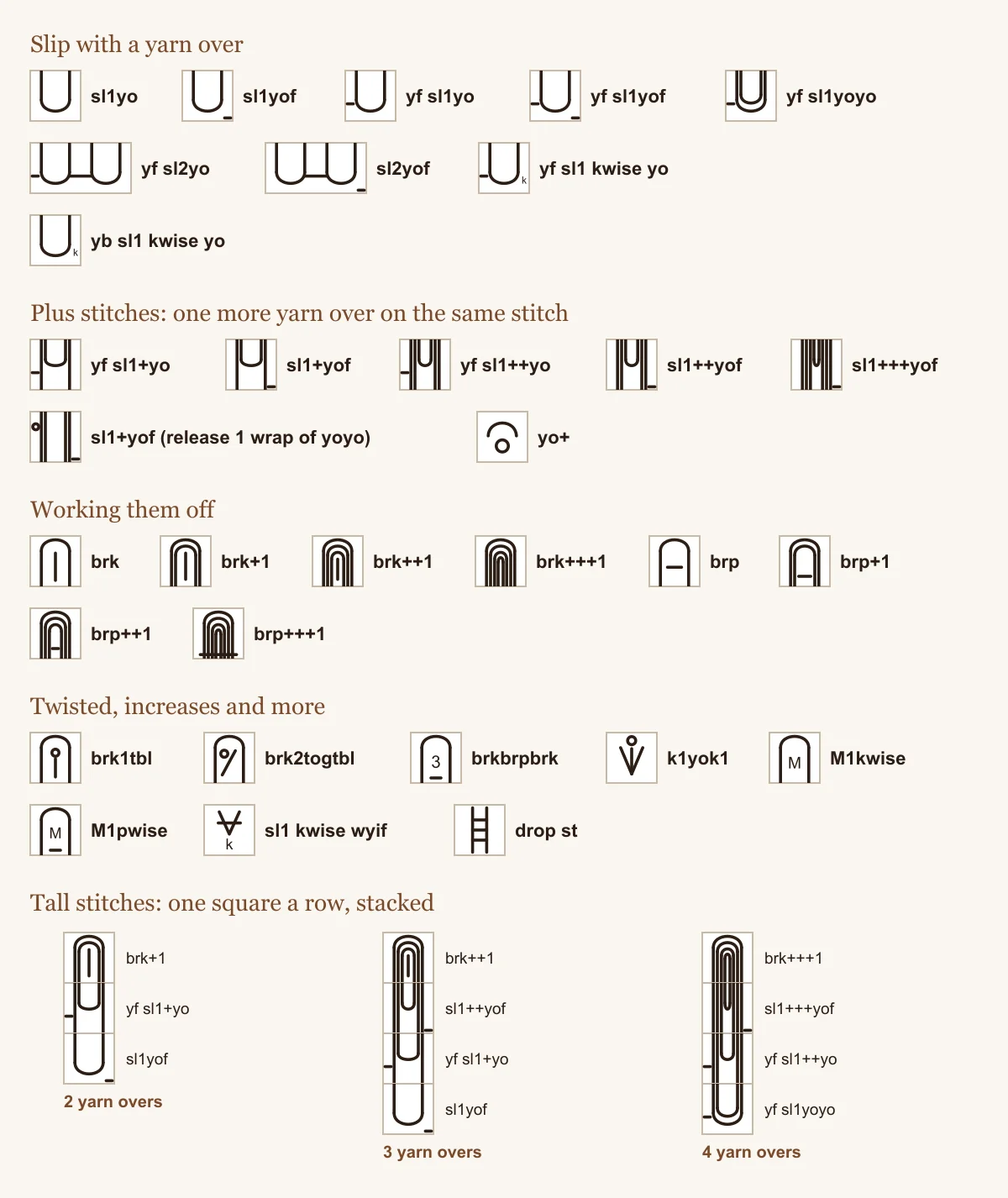
These are the stacks you’ll use most, from plain brioche rib up to a tuck with 4 yarn overs. Each square is labeled with what you’d type in the stitch picker’s search to find it, numbered from the bottom up. And if you search “tuck”, it lists all 17 tuck steps in the order they stack: the slips that start a column, then the “+” slips, then brk+1 through brp+++1.
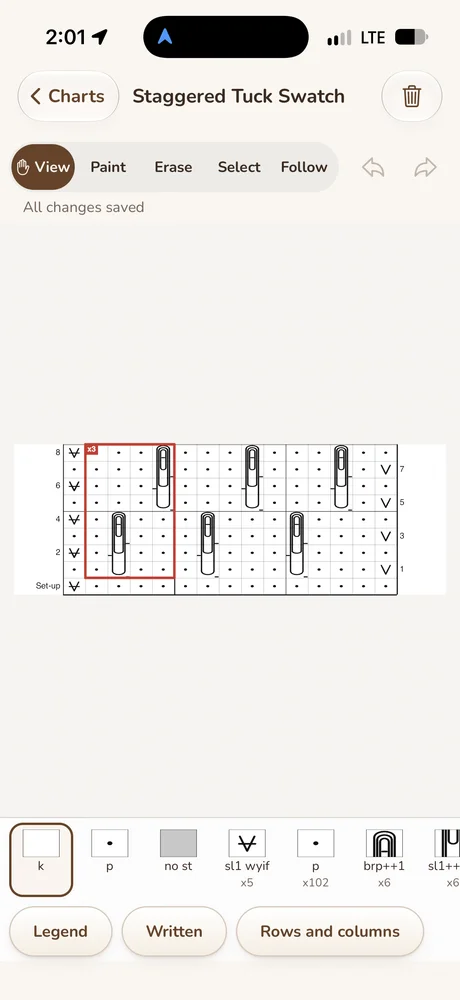
Here’s a small chart I made to show it: two tuck columns, staggered, on a purl background with a slipped edge stitch at each side. The left column carries 3 yarn overs before it’s worked off, and the right one carries 2.
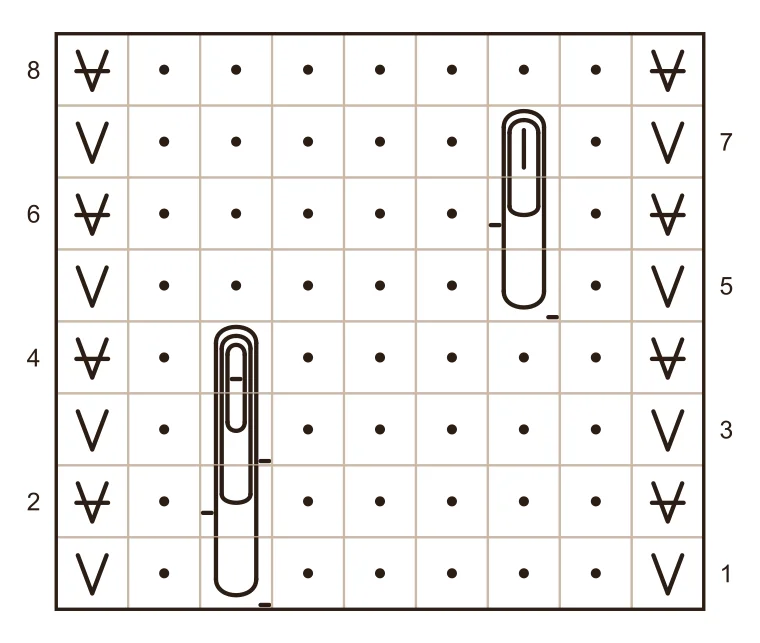
The Written tab reads it like this:
- Row 1 (RS): sl1 wyib, p5, sl1yof, p1, sl1 wyib (9)
- Row 2 (WS): sl1 wyib, k1, yf sl1+yo, k5, sl1 wyib (9)
- Row 3 (RS): sl1 wyib, p5, sl1++yof, p1, sl1 wyib (9)
- Row 4 (WS): sl1 wyib, k1, brk++1, k5, sl1 wyib (9)
- Row 5 (RS): sl1 wyib, p1, sl1yof, p5, sl1 wyib (9)
- Row 6 (WS): sl1 wyib, k5, yf sl1+yo, k1, sl1 wyib (9)
- Row 7 (RS): sl1 wyib, p1, brk+1, p5, sl1 wyib (9)
- Row 8 (WS): sl1 wyib, k7, sl1 wyib (9)
Every row is 9 stitches, because every yarn over belongs to the stitch it’s sitting on.
Look at Row 4. The chart shows the right side, so the top of the left column is drawn as brp++1, the way the stitch looks from the front. Row 4 is a wrong side row, so it’s written brk++1, which is what you actually do with the work turned. The same goes the other way: a brk+1 square on a wrong side row is written brp+1. The slips with a yarn over read the same from either side, so they’re written as they are. Wrong side in the editor flips the whole chart to the back, and shows brk+1 as brp+1.
Here’s the swatch from the video flipped with Wrong side. The row numbers move to the other edge, and the tucks are drawn the way you see them with the work turned.
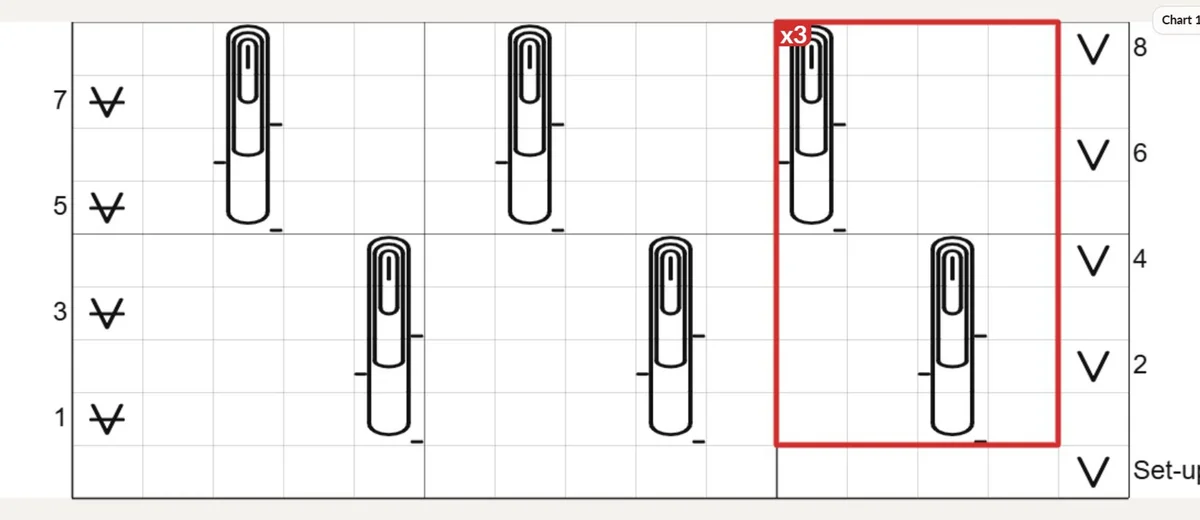
Two of these stitches side by side are written one by one, “brk+1, brk+1”, not “brk+1 x2”, because that’s how brioche patterns write them and it’s easier to follow.
For a pattern with a repeat, draw a repeat box around one repeat and give it a count, and the written rows say it the way patterns do: a short repeat in brackets, like “[p2, sl1yof] 3 times”, and one that runs to the end of the row as “*yf sl1+yo, k2; rep from * to end”.
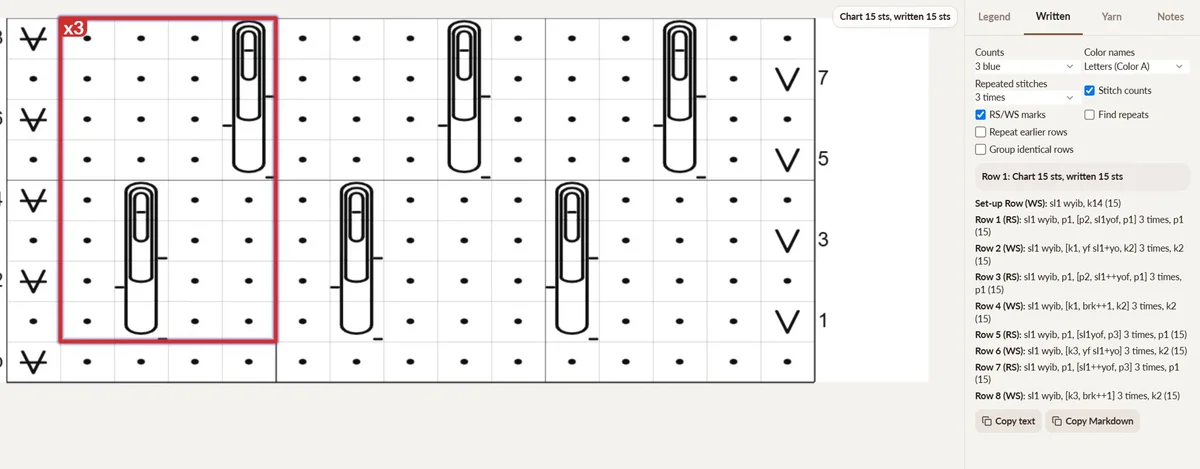
Set-up rows
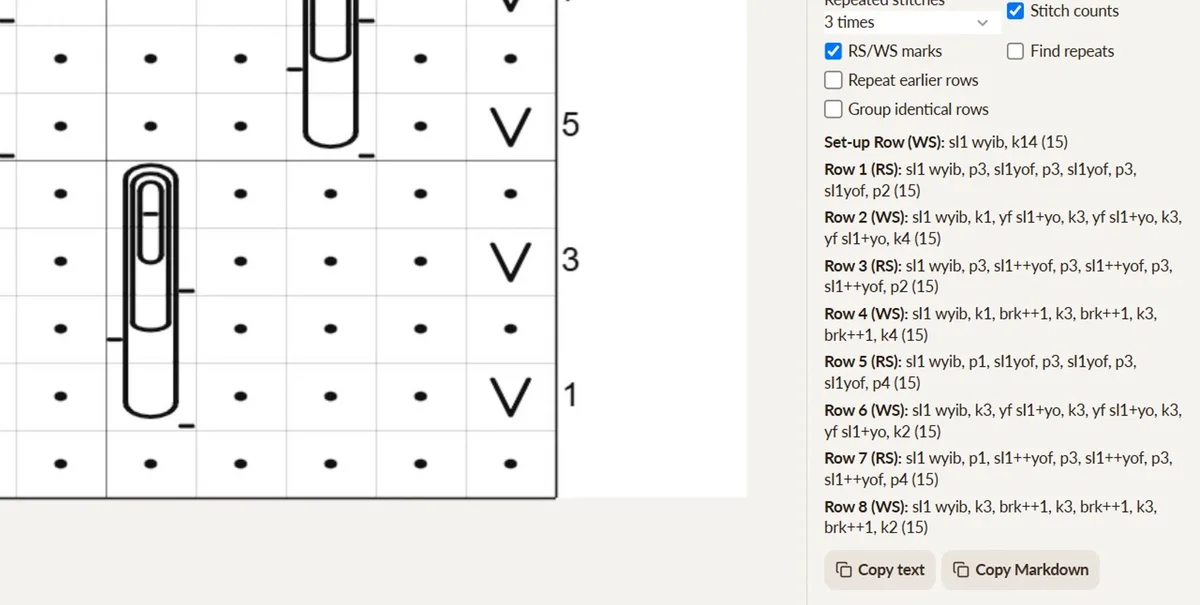
A lot of brioche patterns start with a set-up row that’s worked once and never repeated. On a flat knitting chart, tick The first row is a set-up row in Settings. The bottom row is labeled Set-up beside the chart and written “Set-up Row (WS): …”, and Row 1 is the next row. Row 1 keeps the side you set the chart to start on, so if Row 1 is a right side row, the set-up row is a wrong side row. Add to pattern, tables, the PDF and Follow all say “Set-up Row”, and repeated rows never point back at it.
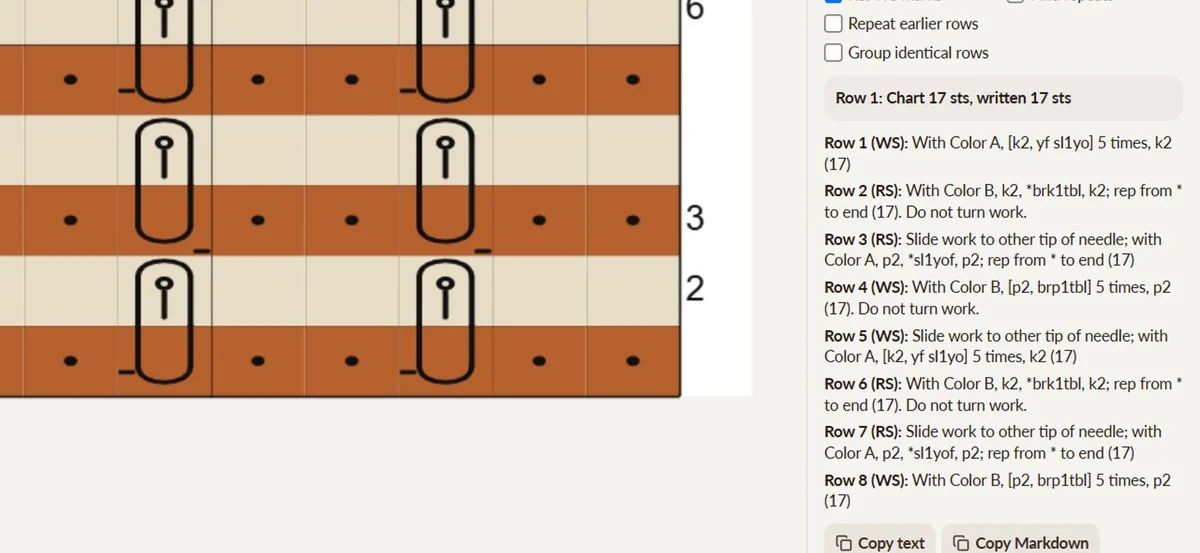
Rows you slide instead of turn
Some brioche works two passes from the same side. You finish a pass, slide the work back to the other tip of a circular needle, and work the next pass with the other yarn. To chart that, right click a square in the row you slide to, or click it and open Rows & columns, and tick Slide, don’t turn, before row N. The row before it ends “Do not turn work.”, the slid row starts “Slide work to other tip of needle; with …”, and the right and wrong sides after it follow the turns, not the row numbers. It’s on every flat knitting chart, so it works for one yarn a row patterns too.
In the second video, a brioche rib in two yarns slides before Rows 3, 5 and 7. Paint each row in its yarn and the written rows name the yarn too, so the Written tab reads it like a pattern:
Brioche books also label their rows their own way, so Settings has three more options on flat knitting charts:
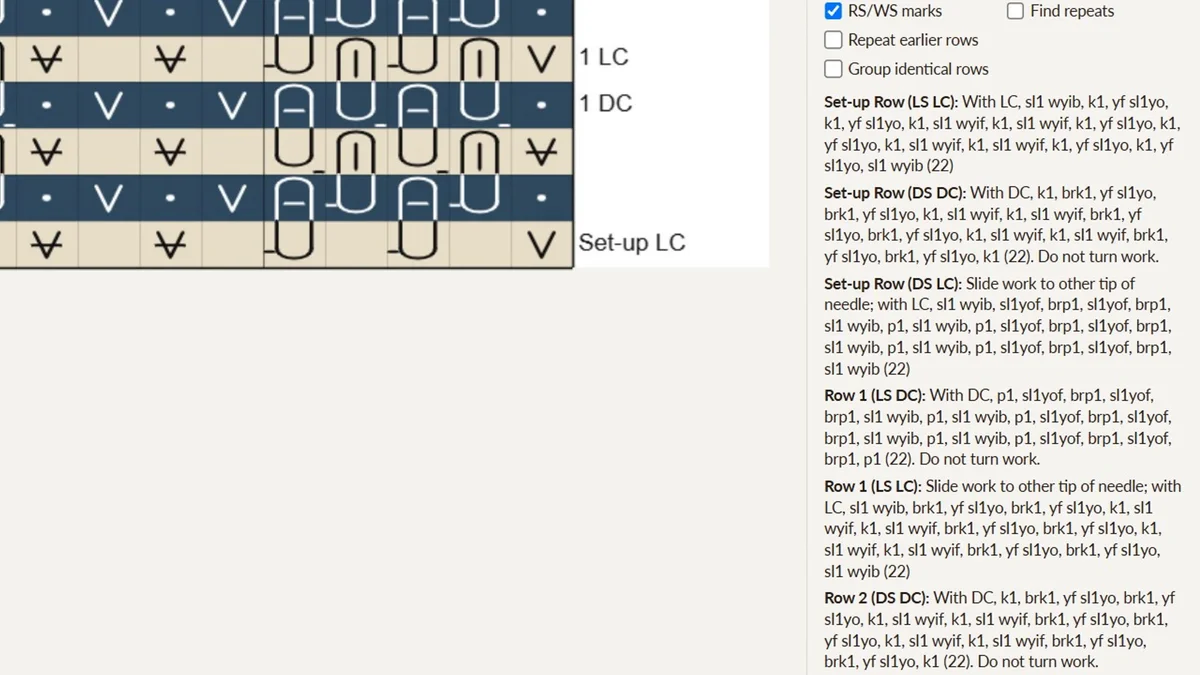
- Number rows by turns: a slid pass keeps the number of the row before it and is named by its yarn, so one row’s two passes are “Row 1 (RS DC)” and “Row 1 (RS LC)”, and the chart shows “1 DC” beside it.
- Side words: RS and WS, or LS and DS, for light side and dark side, so the same row reads “Row 1 (LS DC)”.
- Set-up rows: once the first row is a set-up row, how many charted rows the set-up takes, from 1 to 9, for a set-up worked in several passes. Those rows are written like “Set-up Row (LS LC):”.
The third video starts with three color brioche: three yarns named A, B and C, each row worked in three passes from the same side, sliding twice before you turn. It also uses yf sl2yo, which slips two stitches under one yarn over, and brk2 on the next row works them off. With ordinary numbering every pass gets its own row number. Tick Number rows by turns and Row 2’s three passes all keep the number 2 and are named by their yarn, so the chart says 2 C, 2 B and 2 A and the Written tab says “Row 2 (RS C)”, then “Row 2 (RS B): Slide work to other tip of needle; with B, …”:
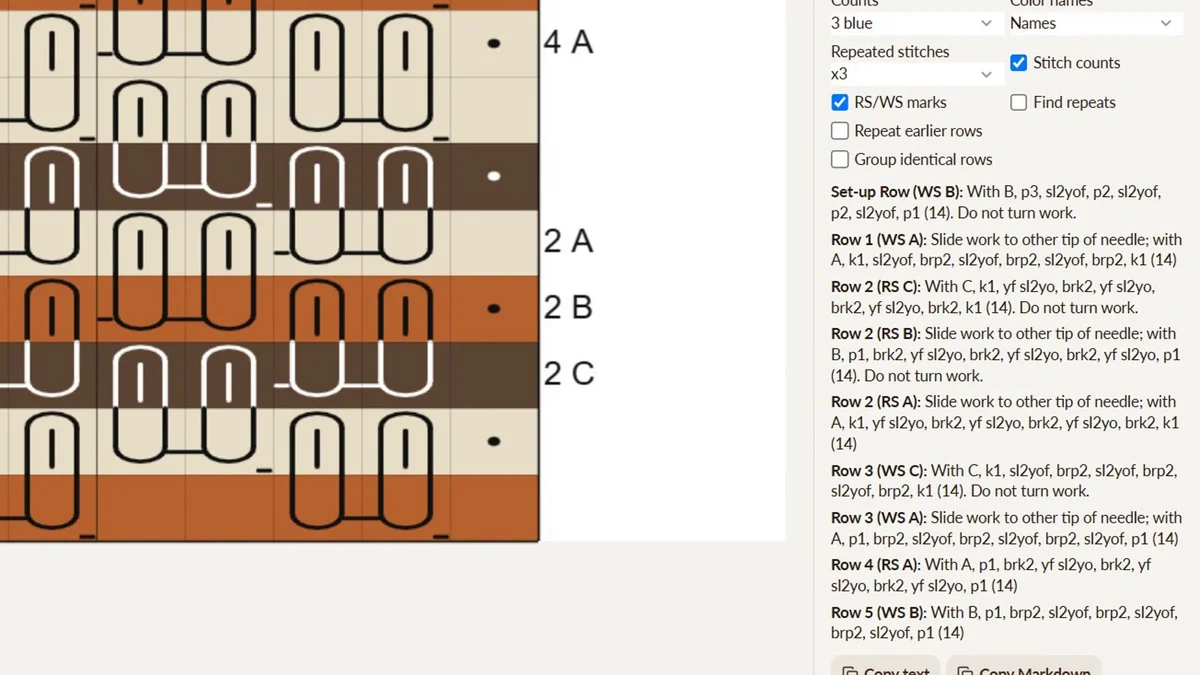
The second half is two color brioche in a light yarn, LC, and a dark yarn, DC. Its set-up is three passes, so Set-up rows is 3, and every row after it is a DC pass and an LC pass. Switch Side words to LS / DS and the rows read the way two color brioche books write them, from “Set-up Row (LS LC)” to “Row 1 (LS DC): … Do not turn work.” and “Row 1 (LS LC): Slide work to other tip of needle; with LC, …”:
I checked these against two of the book’s color brioche patterns, one in two colors and one in three, and every pass’s stitches and the slide wording matched.
Not every color brioche slides. The end of the second video has the same rib in three yarns, where every row turns and each row says which yarn it’s in:
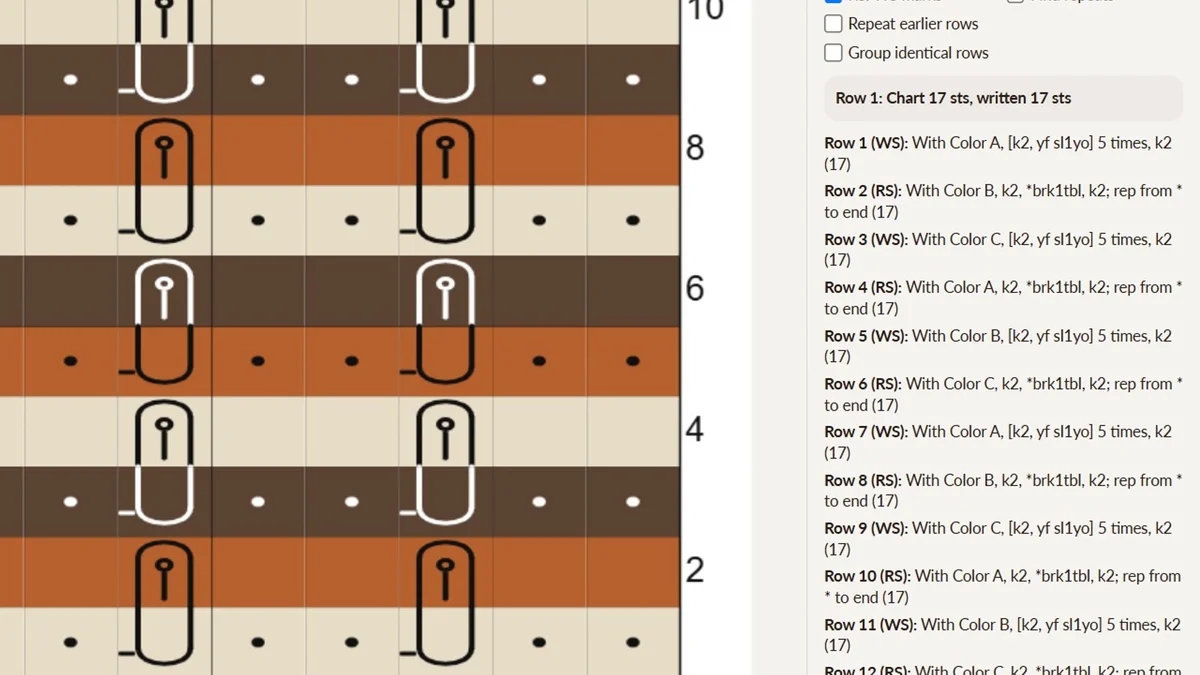
For brioche where every row is two passes, there’s also the Brioche, two passes per row chart type (it used to be called Two color brioche). It isn’t limited to two colors anymore: a chart can carry three or more yarns, and each pass is written in the yarn its stitches are drawn in. That one is Pro.
Counting brioche stitches
Brioche is where stitch counts go wrong, because it’s hard to remember that sl1yo is one stitch and not two. Pattern Review and Count Stitches have a Brioche knitting mode. Both are Pro, and free accounts can try them with their three free tries. (I wrote more about checking stitch counts before testers see a pattern.) In it, a stitch and every yarn over on it count as one stitch, so yf sl1+yo, sl1++yof, yo+, brk+1 and brp+1 all count 1, and brkbrpbrk and k1yok1 make 3 from 1.
They also know that sl1yo, yf sl1yo, sl1yof and yf sl1yof are four different stitches. Whether the yarn starts in front, and whether it ends in front, changes how you work the next stitch, so Pattern Review won’t tell you they’re the same stitch written two different ways.
Brioche charts on your phone
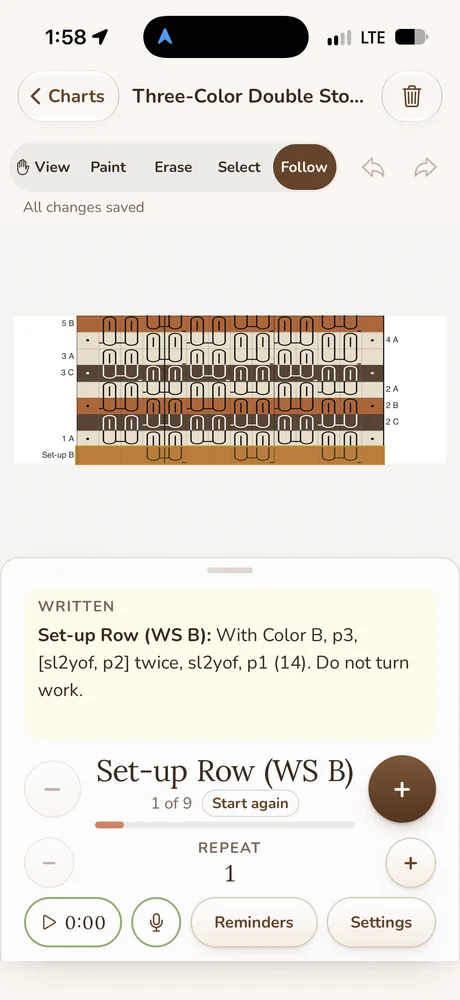
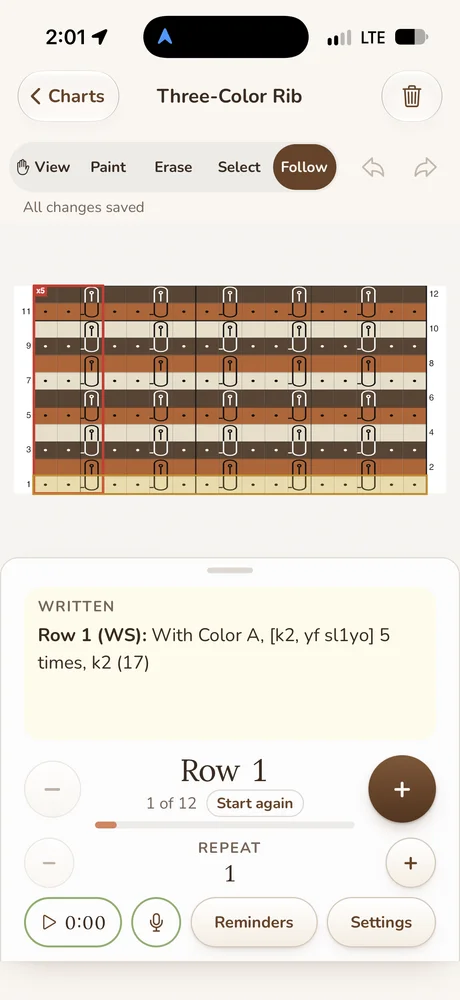
You can build these charts in the NodeStitch iPhone app too, not only follow them. The stitch picker on the phone has the same Brioche section, tall tuck columns join the same way, and searching “tuck” lists the same 17 steps. The Brioche, two passes per row chart type is there with Pro. Follow mode puts the chart on top and the written row underneath, labels included, so a row reads “Row 1 (LS DC)” on the phone just like it does on the computer.
A few things are still set on the computer: the set-up row, Slide, don’t turn, Number rows by turns, Side words and repeat boxes. Set them on nodestitch.app and the phone keeps them, writes them out and follows them. The phone doesn’t have the Wrong side view. It’s one account on both, so a chart you start on one is waiting on the other.
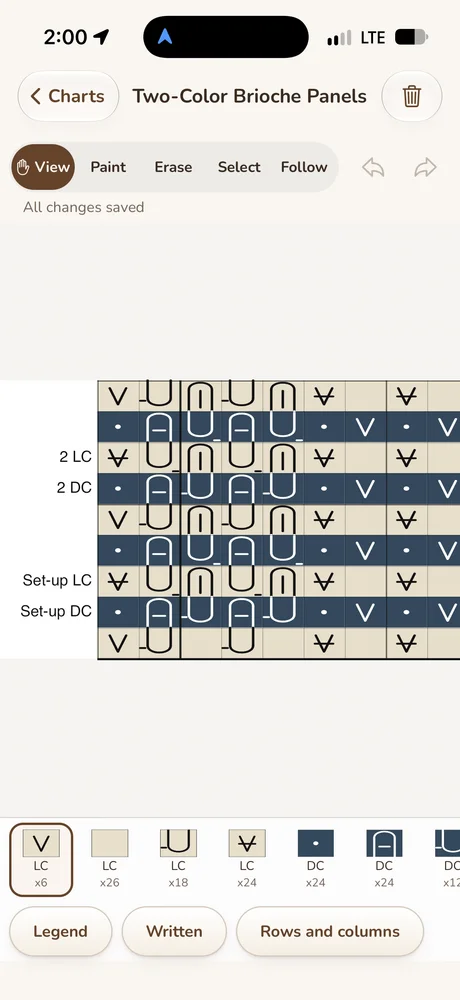
Here they are on an iPhone. The three color double stockinette swatch is in Follow on its set-up row, written out with the yarn and “Do not turn work.” The rib is in Follow on row 1, the two color panels show their LC and DC row labels, and the tuck swatch keeps its set-up row and repeat box.

What’s free and what’s Pro
Drawing a knitting chart with any of these stitches is free, up to 300 x 300, with the legend, the count check and the first three rows written out. Pro is $9.99 a month or $99 a year and gives you every written row, Add to pattern, bigger charts and the Brioche, two passes per row chart type. If you only need one chart finished, you can unlock that one chart for $2.99.
Every brioche symbol for charts worked a row at a time
These are drawn by NodeStitch itself. Each one is in the stitch picker’s Brioche section, and the legend says what it means on both sides. At the bottom are three tall stitches the way you’d chart them, one square a row.
| Abbreviation | Stitch |
|---|---|
| sl1yof | slip 1, yarn over, yarn to front |
| yf sl1yo | yarn forward, slip 1, yarn over |
| yf sl1yof | yarn forward, slip 1, yarn over, yarn to front |
| yf sl1yoyo | yarn forward, slip 1, yarn over twice |
| yf sl2yo | yarn forward, slip 2, one yarn over across both |
| sl2yof | slip 2, one yarn over across both, yarn to front |
| yf sl1 kwise yo / yb sl1 kwise yo | yarn forward / yarn back, slip 1 knitwise, yarn over |
| yf sl1+yo | yarn forward, slip 1 with its yarn over, yarn over |
| yf sl1++yo | yarn forward, slip 1 with its 2 yarn overs, yarn over |
| sl1+yof | slip 1 with its yarn over, yarn over, yarn to front |
| sl1++yof / sl1+++yof | the same with 2 or 3 yarn overs already on the stitch |
| sl1+yof (release 1 wrap of yoyo) | after a yf sl1yoyo, drop one wrap, then sl1+yof |
| yo+ | slip the yarn over and make another one, still 1 stitch |
| brk+1 / brk++1 / brk+++1 | brioche knit with 2, 3 or 4 yarn overs |
| brp+1 / brp++1 / brp+++1 | brioche purl with 2, 3 or 4 yarn overs |
| brk1tbl | brioche knit 1 through its back loop |
| brk2togtbl | brioche knit 2 together through the back loops |
| brkbrpbrk | brk, brp, brk into one stitch, 2 increased |
| k1yok1 | k1, yo, k1 into one stitch, 2 increased |
| M1kwise / M1pwise | brioche make 1 knitwise / purlwise |
| sl1 kwise wyif | slip 1 knitwise with yarn in front |
| drop st | drop the stitch |
The knitting chart post has every other knitting symbol in NodeStitch, including brk, brp and the brioche increases and decreases.
Brioche chart questions
Can it chart fantasy brioche?
Yes. Fantasy and tuck brioche worked flat in one yarn a row go on a plain knitting chart, with the stitch picker’s Brioche section. Tall stitches are one square a row, stacked in a column.
Do the yarn overs change the stitch count?
No. A stitch and every yarn over riding on it are one stitch, so sl1yof, yf sl1+yo and brk+1 all count 1, and the counts at the end of each row stay the same.
Does it write brioche rows for the wrong side?
Yes. The chart shows the right side, and the Written tab writes each wrong side row the way you work it with the work turned, so a brk+1 square on a wrong side row is written brp+1.
Can a chart start with a set-up row?
Yes. Tick The first row is a set-up row in Settings, and that row is written “Set-up Row (WS): …” with Row 1 after it.
What’s the difference between sl1yo and sl1yof?
Whether the yarn starts in front and whether it ends in front. That changes how you work the next stitch, so NodeStitch treats sl1yo, yf sl1yo, sl1yof and yf sl1yof as four different stitches.
Can NodeStitch chart two color brioche?
Yes. Pro has a Brioche, two passes per row chart type, where each row is worked in a light pass and a dark pass, with two or more yarns. On any flat knitting chart you can also slide instead of turn before a row, and number rows by turns the way brioche books do.
Can I chart brioche on my phone?
Yes. The NodeStitch iPhone app builds and follows these charts, with the same Brioche stitches and the same written rows. The set-up row, slides and book-style labels are set on the computer, and the phone follows them.
Is it free?
Drawing these charts is free, up to 300 x 300, with the first three rows written out. Pro is $9.99 a month or $99 a year, or you can unlock one chart for $2.99.