NodeStitch for iPhone: Row Counter, PDF Patterns and Stitch Charts
NodeStitch is a crochet and knitting app for iPhone for following patterns and for writing your own. Follow a PDF pattern with a row counter, voice counting and stitch charts with written instructions. When you’re designing, photograph a notebook page, dictate rows as you work, paint a stitch chart and add progress photos. It all saves to your NodeStitch account, ready to lay out and export as a PDF pattern on the website.
The iPhone app is free to download and free to start, with paid Tracker and Pro plans for more.

How the iPhone app works with the NodeStitch website
The NodeStitch website is where you write and lay out a crochet or knitting pattern, including its pages, numbered photos, tables, stitch count checks and exported PDF. When I’m crocheting away from my computer, I want the pattern on my phone, with my place saved for the next time I pick it up.
I used to write my patterns in a notebook first, and the notebook is still where a lot of rows start. So the iPhone app isn’t a smaller copy of the website. It does the parts of pattern design that happen away from the computer, and hands them to the website:
- Capture the rows while you work. Photograph a notebook page, or type or dictate rows as you crochet. They’re saved into a NodeStitch project.
- Add your progress photos to that project’s photo library straight from the camera.
- Sit down at the computer. The project is already on nodestitch.app, rows and photos in it, ready to lay out and export as a PDF pattern.
- Bring the finished pattern back to the phone. “From my projects” turns a project on nodestitch.app into a PDF pattern in your phone’s library, and Re-import updates it after you change the project.
- Chart on either one. A stitch chart you paint on the phone is the same chart on the website, and the other way around.
- Follow patterns on the phone, your own and the PDFs you’ve bought from other designers, with a row counter that remembers where you stopped.
| iPhone app | nodestitch.app | |
|---|---|---|
| Follow a PDF pattern with a row counter | Yes | No |
| Count rows by voice, home screen widget | Yes | No |
| Notes, pen and highlighter on a PDF | Yes | No |
| Photograph a notebook page into a pattern | Yes | Yes, as an upload |
| Type or dictate rows as you work | Yes | Typed into a Pattern Box |
| Paint and follow stitch charts | Yes | Yes |
| Lay out pattern pages, number photos, check stitch counts | No | Yes |
| Export the finished pattern as a PDF | No | Yes |
| Stitch dictionary with US/UK terms | Yes | Yes |
| Gauge, yarn amount and size tools | Yes | No |
The app and website use one NodeStitch account for your projects, charts and plan, so nothing needs to be sent from one to the other. Keeping counter progress in step across devices takes Tracker or Pro.
A crochet and knitting pattern app for iPhone
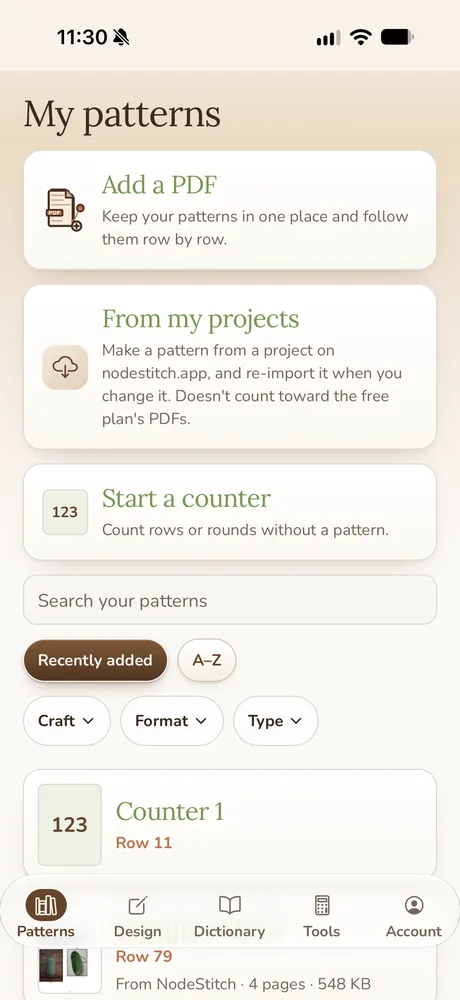
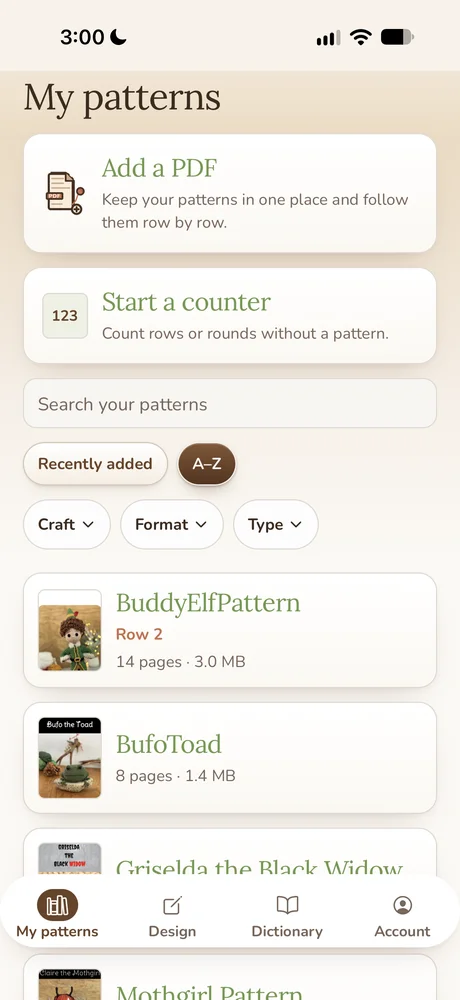
- Keeps your PDF patterns in one library. Add a PDF from Files, or bring in your own NodeStitch projects, then search by name and filter by craft, format and type.
- Counts rows and rounds. A big counter sits above the pattern, with extra counters, parts for pieces like “make 2”, and row reminders. How many you get depends on your plan.
- Moves a highlight bar down the page so you don’t lose your place in a long round.
- Lets you mark up the pattern with a pen, a highlighter and pinned notes.
- Counts by voice. Say “next” to add a row, “back” to take one away.
- Follows stitch charts for crochet, knitting and filet crochet with the written row under the chart, and makes cross stitch charts too. Some chart types are Pro.
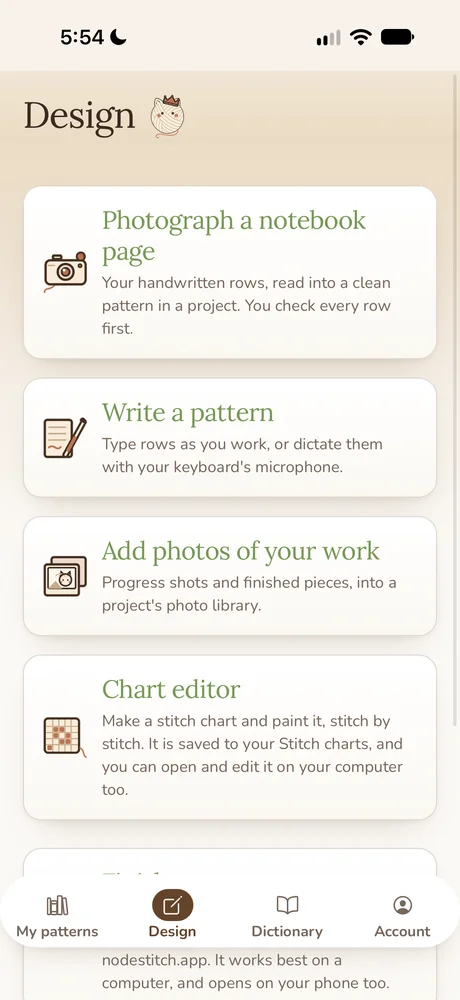
- Reads a notebook page into a pattern, and lets you type or dictate rows as you work.
- Has a stitch dictionary with US and UK terms and translations.
- Has a Tools tab for gauge, even increases and decreases, yarn amounts, hook and needle sizes, yarn weights and units.
A PDF pattern app for iPhone with a row counter
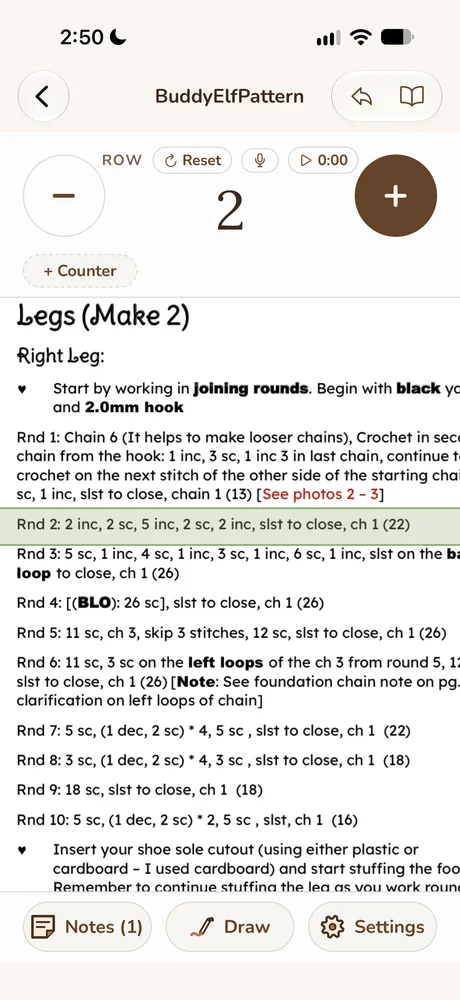
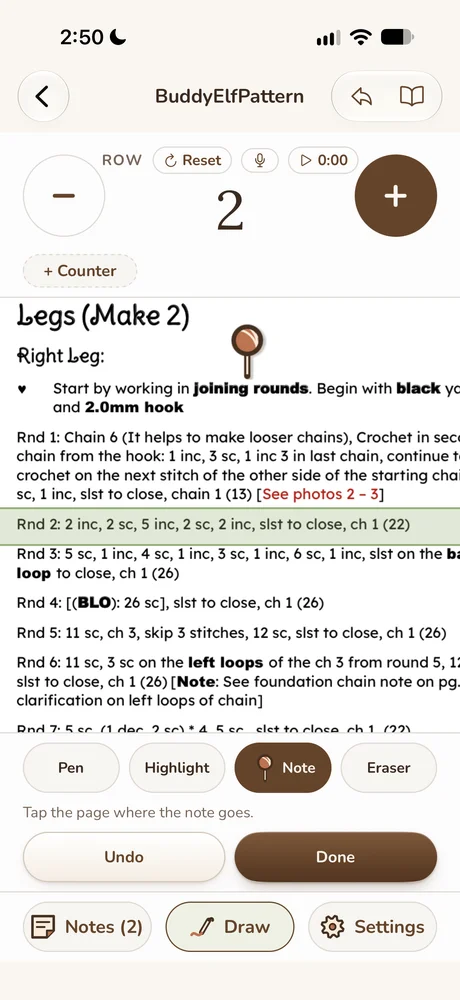
Open a PDF pattern and the row counter sits right above it. Tap the plus as you finish a round. The highlight bar moves with you, so the round you’re on is always the one with the green band across it, and NodeStitch remembers the row the next time you open the pattern.
You can add a second counter for the repeats inside a round, a timer to see how long a piece takes, and row reminders that pop up when you reach a row, like “add the safety eyes at round 12”. A pattern with a pair of legs or two arms can be split into parts, so each piece keeps its own count.
Each counter has its own settings: how much a tap adds, a number to start over at (it counts a repeat each time it wraps), and a link to the row counter so the two move together. Stats show the rows counted, the time on the timer and the dates you started and last worked, for the whole project and for each part. You can also save the pattern’s swatch, stitches across and rows down in inches or cm, and read it back in both units.
Follow your own NodeStitch patterns
“From my projects” lists your projects on nodestitch.app. Pick one and NodeStitch makes it into a PDF pattern in your library, the same PDF the website would export. Change the project later, then choose Re-import from project, and the pattern is replaced with the new version while your counters, notes and highlights stay. Nothing updates by itself, so the pattern on your phone only changes when you ask. Patterns made this way don’t count toward the free plan’s 2 PDFs.
Notes stay on the page where you put them. Use the pen to circle a stitch count, the highlighter for the round you keep getting wrong, or a pinned note for “I used cardboard for the sole”. They’re yours: the PDF itself never changes.
Count crochet and knitting rows with your voice
Tap the microphone and say “next” to add a row, “back” to take one away, or “repeat” to add a repeat. It’s for when both hands are full of yarn. The iPhone’s own speech recognition listens only while the microphone is on, and it runs on the phone when your phone can do that.
A row counter on your home screen
With Tracker or Pro, a home screen and lock screen widget shows the pattern or chart you followed last and the row you’re on. Tap its plus without opening the app, and the rows are counted the next time you open NodeStitch.
Use it as a plain row counter
Not every project has a PDF. “Start a counter” gives you a counter for rows or rounds on its own (2 of them on Free), for a hat you’re making up as you go or someone else’s pattern in a printed book. It has its own repeat counter, reminders and notes, and you can attach a PDF, a NodeStitch pattern or a chart to it later.
Create and follow stitch charts on iPhone
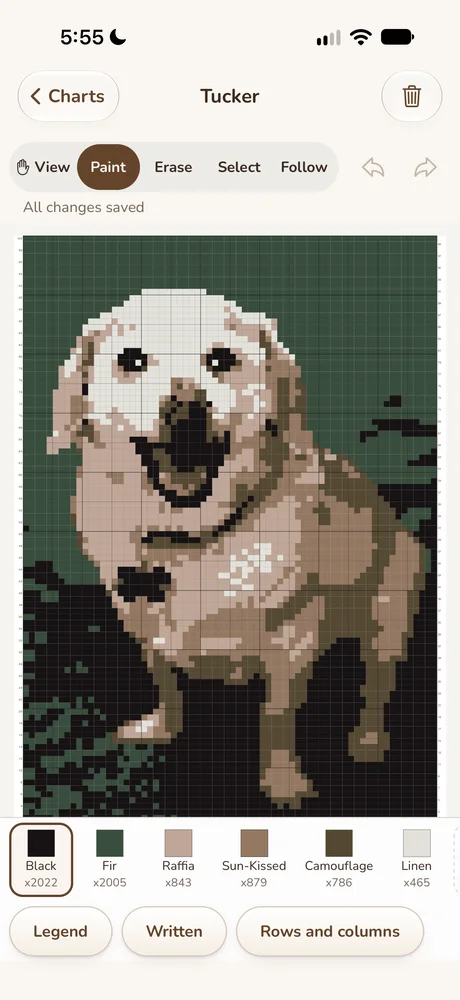
NodeStitch is also a stitch chart app for crochet, knitting, filet crochet and cross stitch. You can make crochet and knitting stitch charts on the website, and charts you make there are on your phone too. You can paint, erase, select, cut, copy, paste, mirror, rotate and undo, add or delete rows and columns, and pick colors from brand yarn palettes or your own saved yarns. Every editing tool is free, and anything you change is saved to the same chart on the website.
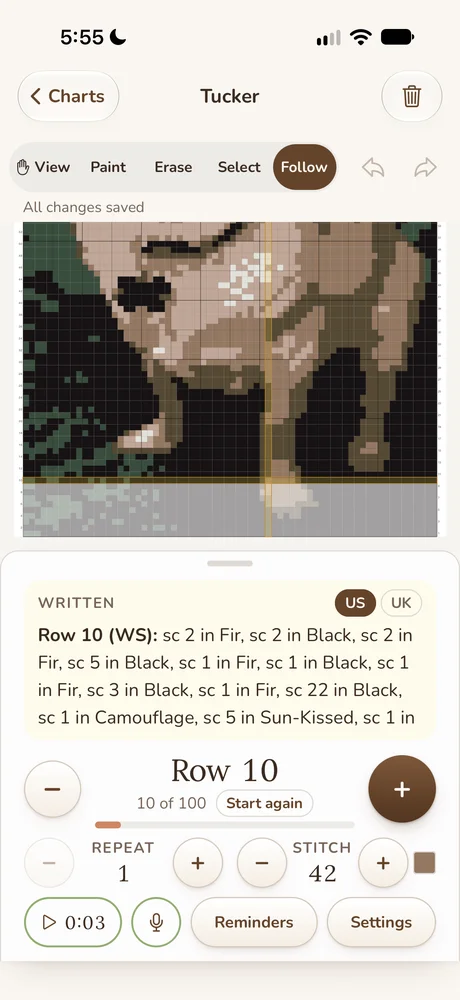
Follow mode is the part I’d use most. It puts the chart on top and the written instructions for the current row underneath, in US or UK terms. Tap the plus and the row moves up the chart, with a stitch counter for colorwork where you need to know which stitch you’re on. By voice, “next stitch” moves the stitch counter and “next row” moves the row. Free and Tracker show the written instructions for the first 3 rows; Pro writes out every row.
If another designer shares a NodeStitch chart with you by link, it opens on the phone in Follow mode too, voice counting included, and you don’t need an account to open it. Signed in, the link also gets parts, reminders, the timer and stats.
It works for filet crochet too. In the filet heart below, row 2 is highlighted on the chart and the written row tells you where the lacets go and when to change color.
You can also start a chart from a photo on the phone, up to 300 x 300 on Free, and match its colors to a yarn line or to DMC floss, with a list of which floss each color became. Removing the photo’s background uses a free try, or is included with Pro.
Cross stitch charts on your phone
You can make and edit a cross stitch chart on the phone too, not just look at it: full crosses, part stitches, backstitch and French knots, picked from a DMC floss list or your own saved floss. The key lists strands, stitch counts and about how many skeins each color needs, and a hint tells you when two floss colors will look alike on fabric.
Turn a notebook page into a pattern
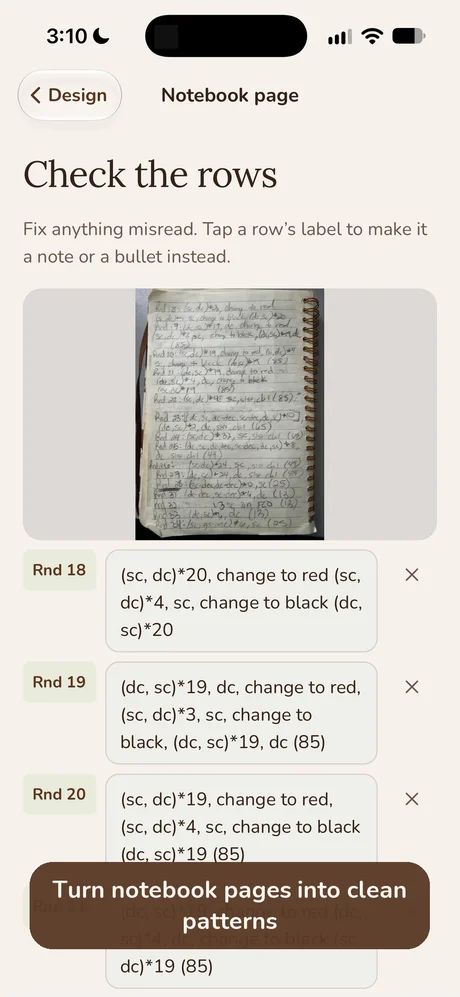
Photograph a page of handwritten rows and NodeStitch reads it into a clean list of rounds. You check every row before it’s saved: fix anything misread, or tap a row’s label to make it a note instead. Then it goes into a new project or onto the end of one you already have, ready to lay out on the website.
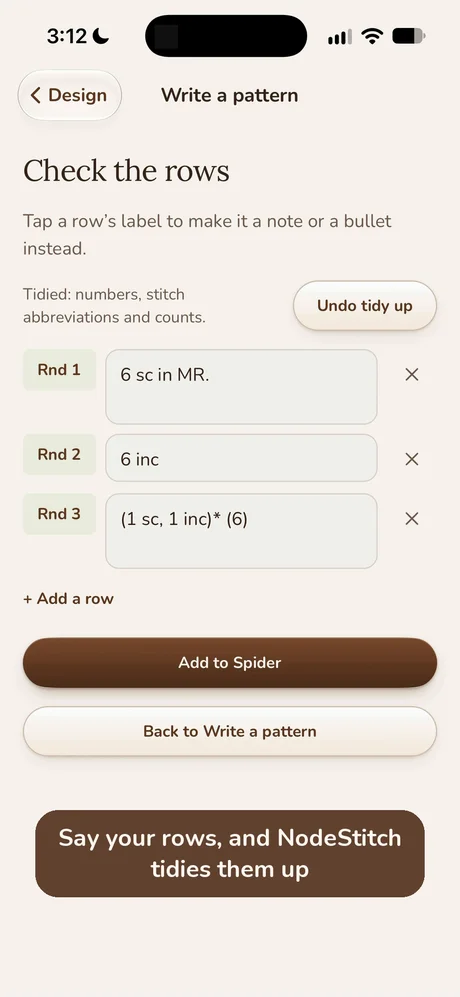
If you’d rather work row by row, “Write a pattern” lets you type rows as you crochet, or dictate them with your keyboard’s microphone. It has its own round or row counter with a “Start at” box, and when you’re done it can write the range of rounds you worked into your text. Photos you take there go into the project too. Tidy up then turns “round one, six single crochet in magic ring” into “Rnd 1: 6 sc in MR”, with the numbers, stitch abbreviations and counts cleaned up. It’s a fixed set of rules from the stitch dictionary, it doesn’t write anything for you, and you can undo it.
Crochet and knitting calculators in the Tools tab
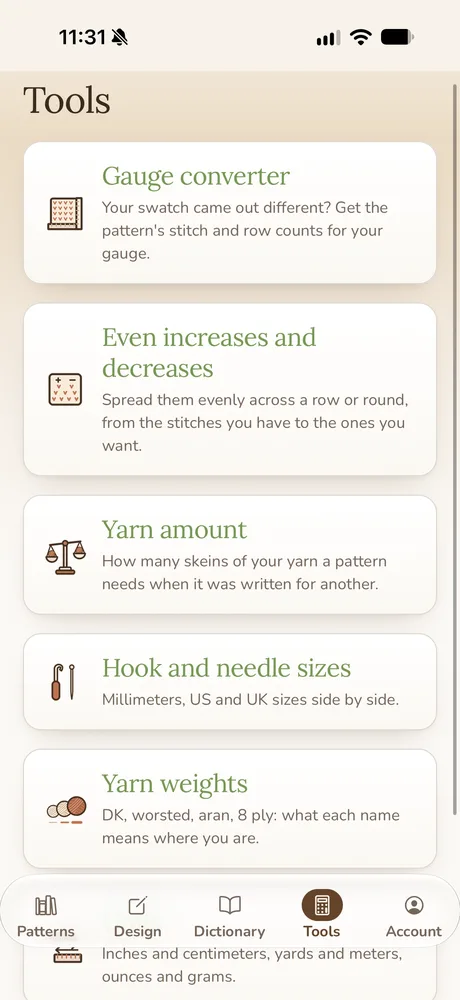
The Tools tab has six calculators for the questions that come up mid project:
- Gauge converter. Your swatch came out different from the pattern’s? It gives you the stitch and row counts for your own gauge.
- Even increases and decreases. Spread them evenly across a row or round, from the stitches you have to the stitches you want.
- Yarn amount. How many skeins of your yarn a pattern needs when it was written for a different yarn.
- Hook and needle sizes. Millimeters, US and UK sizes side by side.
- Yarn weights. DK, worsted, aran, 8 ply: what each name means where you are.
- Units. Inches and centimeters, yards and meters, ounces and grams.
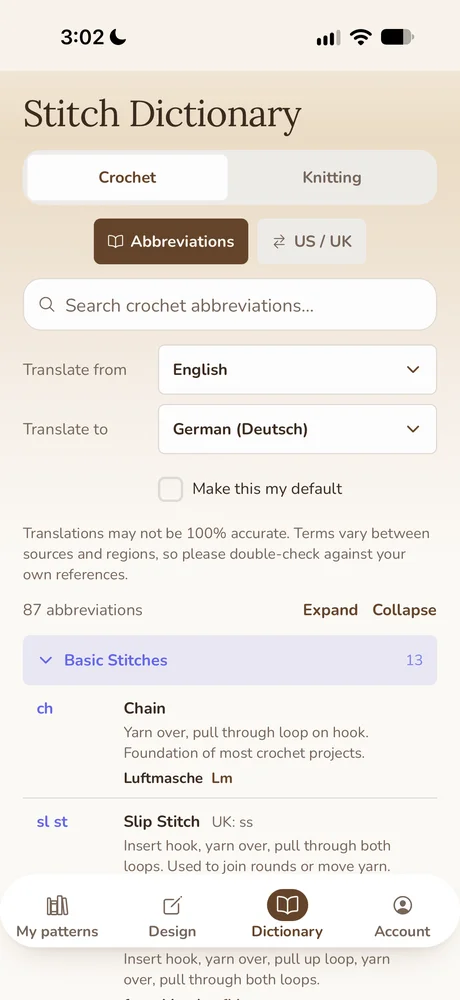
A crochet and knitting stitch dictionary with US and UK terms
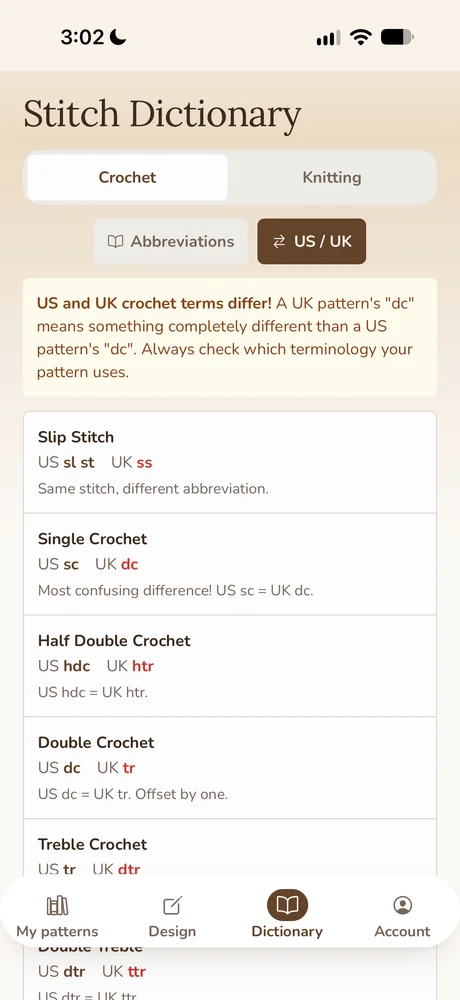
The Dictionary tab has the crochet and knitting abbreviations, a US/UK table, and translations into other languages. The US/UK table is the one I’d bookmark: a UK pattern’s “dc” is a US single crochet, and that one difference has ruined plenty of first rounds. The dictionary also opens over a PDF pattern, so you can look up a stitch without leaving the page.
What the iPhone app costs
The app is free to download and free to start. You need a NodeStitch account, the same one you use on the website.
| Free | Tracker | Pro | |
|---|---|---|---|
| Price | $0 | $2.99 a month, $14.99 a year, or $29.99 once | $9.99 a month or $99 a year |
| PDF patterns | 2, not counting your own NodeStitch projects | As many as you like | As many as you like |
| Counters per pattern | 2 | As many as you like | As many as you like |
| Row reminders and parts | 3 reminders and 2 parts per project | As many as you like | As many as you like |
| Counters kept in step on every device | No | Yes | Yes |
| Notes and marks on your patterns | Yes | Yes | Yes |
| Tools tab and stitch dictionary | Yes | Yes | Yes |
| Stitch charts | Up to 300 x 300, with the first 3 written rows | Up to 300 x 300, with the first 3 written rows | Every chart type, up to 1,000 x 1,000, written instructions for every row |
| Counters without a pattern | 2 | As many as you like | As many as you like |
| Home screen and lock screen widget | No | Yes | Yes |
| Notebook pages read into patterns | 3 free tries, shared with other free try features | 3 free tries, shared with other free try features | As often as you like |
| Full Pro design features on the NodeStitch website | No | No | Yes |
Free and Tracker share 3 free tries across the app and the website; a notebook read uses one however many pages it covers. Pro also includes 20 GB for photos, and it’s the same Pro as on the website: buy it in the app or on the website and it counts in both places.
What still happens on the computer
The phone app is where a pattern gets started and followed. Laying out the finished pattern, with photos numbered, tables, stitch counts checked and the PDF exported, is still a job for nodestitch.app on a computer. Everything you start on the phone is waiting there when you sit down. If you want the whole list of what the website does, it’s in what NodeStitch can do.
Frequently asked questions
Is NodeStitch on Android?
Not yet, but an Android version on Google Play is coming shortly. For now it’s on iPhone.
Does it work on iPad?
Yes. NodeStitch runs on iPad too, from the same App Store listing.
Do I need an account?
Yes. The app uses your NodeStitch account, so your patterns, charts and Pro plan are the same on the phone and the website.
Can I use it without a pattern?
Yes. “Start a counter” counts rows or rounds without a PDF. Free accounts get 2 of these counters, and Tracker and Pro get as many as they like.
Does it work for knitting as well as crochet?
Yes. The row counter and PDF library work for any pattern, the stitch charts cover knitting, crochet, filet crochet and cross stitch, and the dictionary has a knitting tab with its own US/UK terms.