A C2C crochet chart maker that writes every row, with its arrow
NodeStitch is pattern design software with a corner to corner (C2C) crochet chart maker built in. You paint the blocks, and the Written tab writes every diagonal out the way C2C patterns are written: each row with its arrow, RS or WS, its colors in the order you work them, the count in blocks, and a line where the corner turns. It also says what a block is, “Each block: 3 dc + ch 3.”
Why C2C needs its own chart type
A C2C chart looks like any colorwork grid, but you don’t work it in rows across. You start in one corner and work diagonals, adding a block at each end until you reach the corner, then taking them away. Every diagonal is turned, so the rows go back and forth, and every square is a block of stitches, not one stitch.
Writing that out by hand is where C2C patterns go wrong. You read each diagonal off a grid at an angle, keep track of which way you’re going, and count colors that are easy to lose. I rebuilt nine published C2C patterns in NodeStitch and compared their written rows with the designers’ own, and most of what follows came from where the two didn’t match.
Numbered by diagonal, with the corners marked
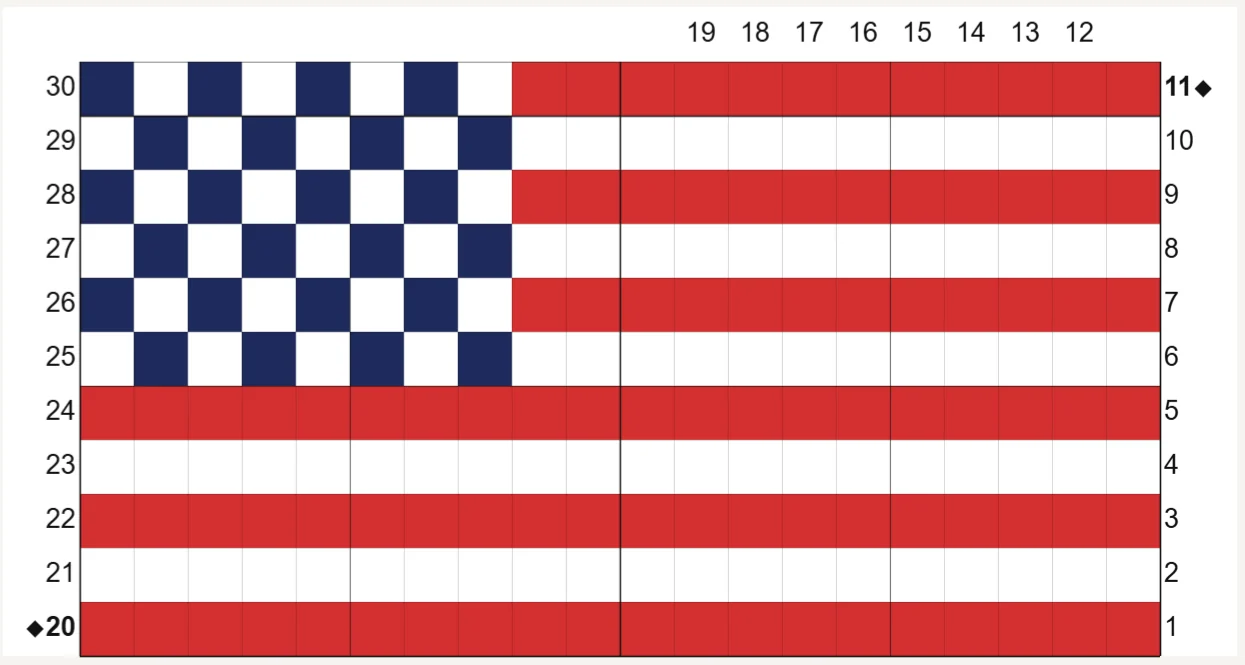
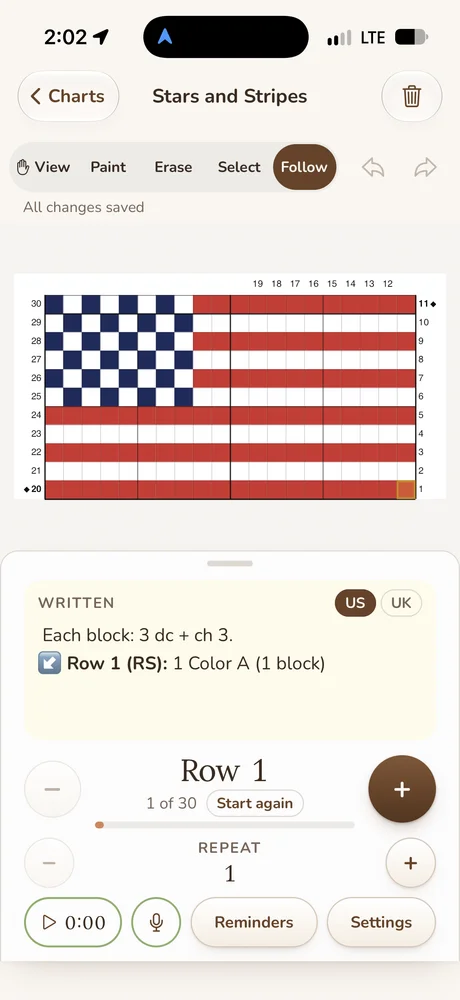
The chart is numbered by diagonal from the corner you start in, and any of the four corners can be the start. Each diagonal is numbered once, and Diagonal numbers shows them on both sides, the right, the left, or not at all. The corner, the last increase row, gets a small diamond beside its number. A rectangle like this flag has two corners: at the first, Row 11 here, one edge stops increasing, and at the second, Row 20, both edges start decreasing.
What the written rows look like
These are real rows from the flag in the video:
- Each block: 3 dc + ch 3.
- Row 1 (RS): ↙ 1 Color A (1 block)
- Row 2 (WS): ↗ 1 Color A, 1 Color B (2 blocks)
- Row 11 (RS): ↙ 1 Color A, 1 Color B, 1 Color A, 1 Color B, 1 Color A, 1 Color B, 1 Color A, 1 Color B, 1 Color A, 1 Color B, 1 Color A (11 blocks)
- Row 11 is a corner: from the next row, decrease at the top edge and keep increasing at the other end, so each row stays 11 blocks long.
- Row 19 (RS): ↙ 1 Color A, 1 Color B, 1 Color A, 3 Color B, 1 Color A, 1 Color B, 1 Color A, 1 Color B, 1 Color A (11 blocks)
- Row 20 is the corner: from the next row, decrease at both ends, so each row is 1 block shorter.
- Row 30 (WS): ↗ 1 Color C (1 block)
What it does for you:
- Arrows. The rows alternate direction, and each starts with the arrow it’s worked in: from a bottom right start, Row 1 ↙, Row 2 ↗, Row 3 ↙. ↙ means the row is worked from the right edge down toward the bottom left, and ↗ means it’s worked from the bottom edge up toward the top right. Its colors are listed in that order. Set Row arrow in the Written tab to Before the label and it reads “↙ Row 5 (RS): …”, the way most C2C patterns that use arrows write it, or to None if yours leaves them out.
- RS and WS. Every diagonal is turned, so the sides alternate from a right side Row 1. If your pattern calls Row 1 a wrong side row, set Row 1 is to WS in Chart settings and every mark turns.
- Which way Row 2 goes. Some designers work every row the other way. Row 2 is worked in Chart settings turns every row around, with a small picture of Rows 1 to 3 and their arrows beside it so you can see which you’re picking.
- Counts in blocks. Every row ends “(7 blocks)”, so nobody mistakes it for a stitch count. You can also write counts as “blue x 3, white x 1”, counting every color, singles too, as many C2C patterns do.
- Corner lines. Each corner gets its own line after its row, saying what changes from the next row on.
- Color names. Rows can say “Red” instead of “Color A” if you pick Names under Color names.
- US or UK terms. In UK terms the block reads “3 tr + ch 3”.
- Copy it out. Copy text and Copy Markdown in the Written tab give you every row to paste anywhere.
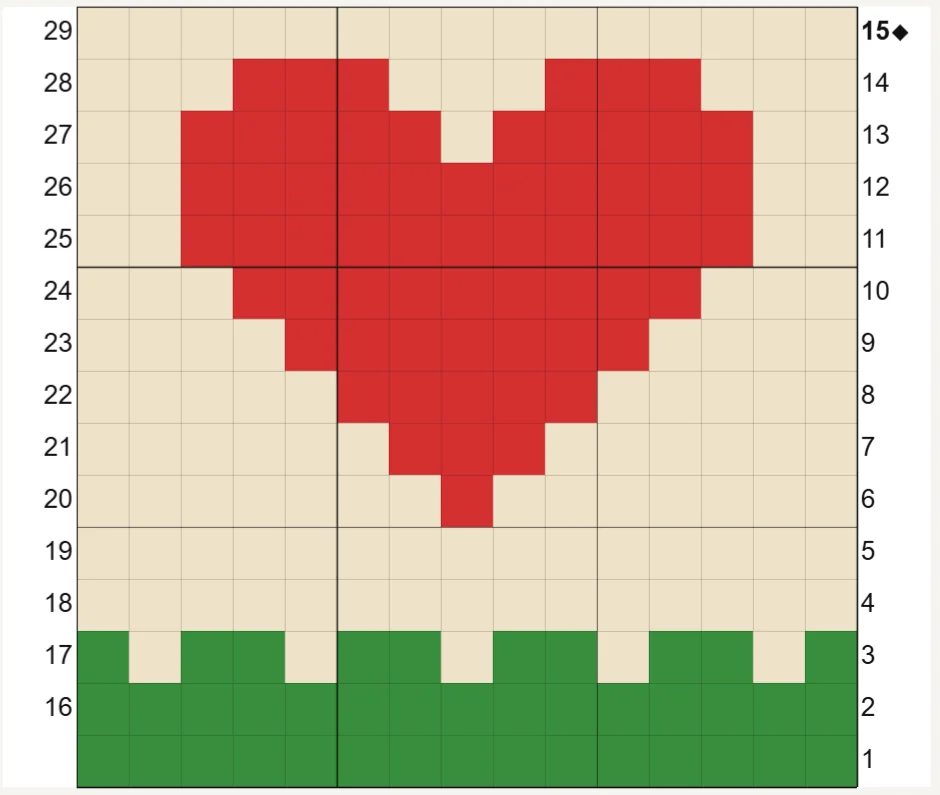
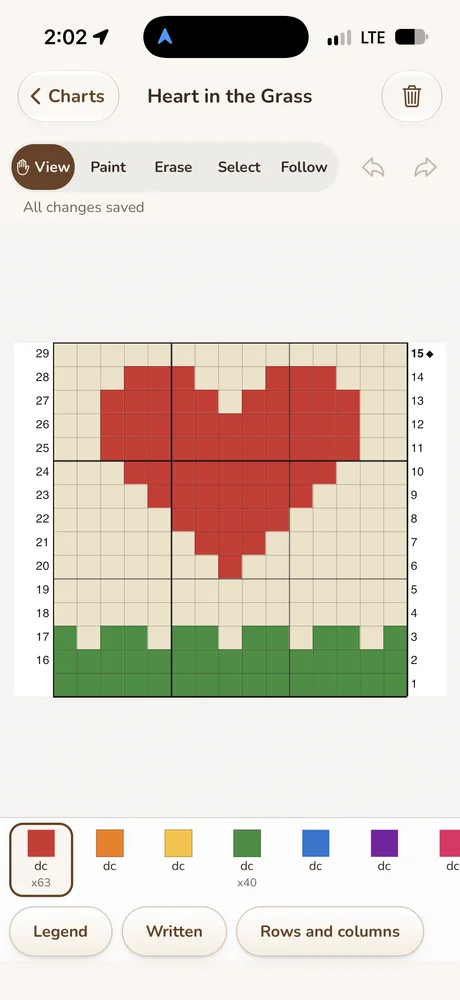
The heart in the video is square, so it has one corner, Row 15, and from there every row is one block shorter. On the flag, the rows after its second corner shrink the same way: “Row 21 (RS): ↙ 1 Color A, 5 Color B, 1 Color A, 1 Color B, 1 Color A, 1 Color B (10 blocks)”.
A square is a block
Every square on a C2C chart is a block, not a double crochet, so NodeStitch names it that way:
- A new C2C chart says what a block is, before Row 1 and in the legend: “Each block: 3 dc + ch 3.” Set the numbers under Block in Chart settings (2 and 2 gives “Each block: 2 dc + ch 2.”), or leave the stitches empty to leave the line out.
- The legend lists each color by letter, Color A first, with its count in blocks: “A Red 96 blocks”, and says the block once beneath.
- The palette tile shows the color’s letter, and hovering a square reads “block, Color A: Red”.
A new C2C chart also starts white, so you paint your design onto a plain background instead of filling it first.
How much yarn, in blocks
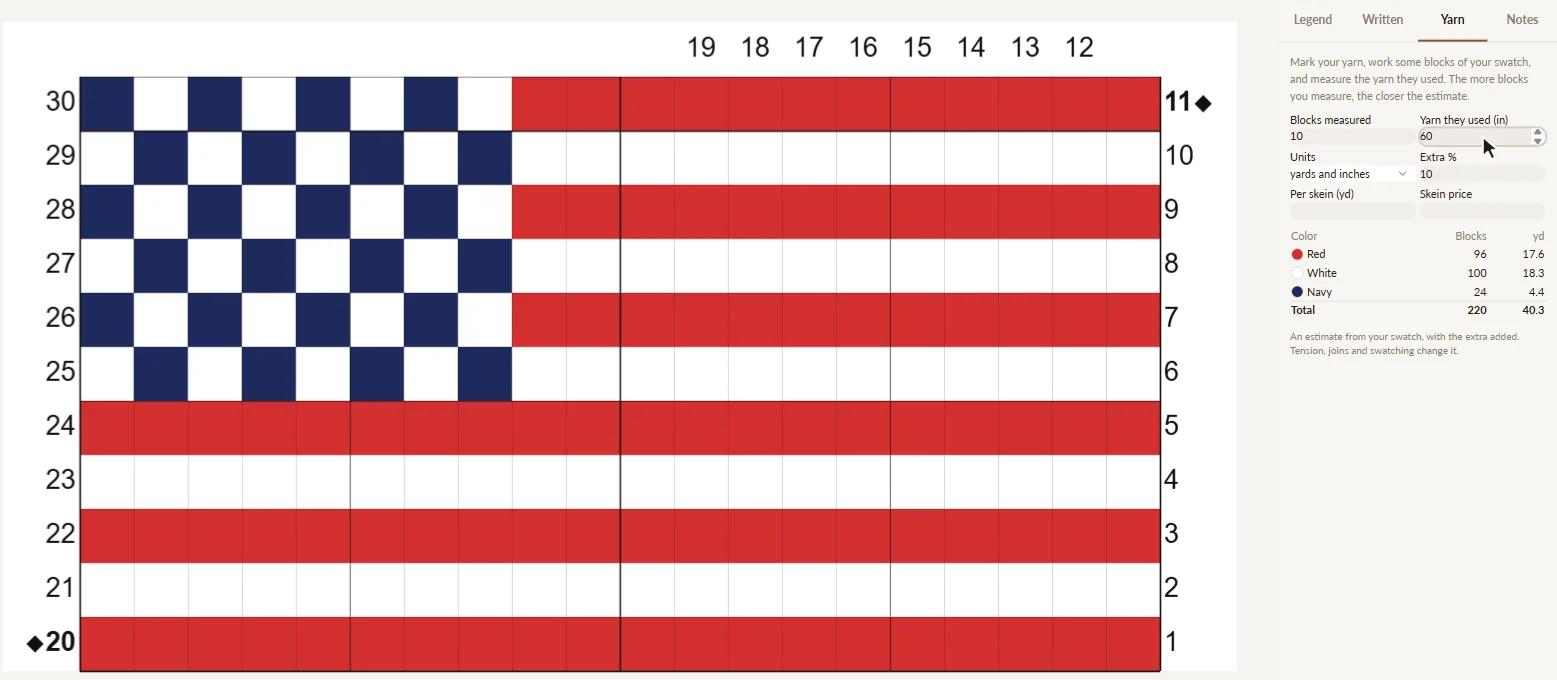
The Yarn tab counts in blocks too. Crochet a few blocks of your swatch, measure the yarn they used, and it estimates each color and the total, with the extra you choose. Add the yards per skein and a skein price and it works out skeins and cost per color as well. For the flag in the video, a 10 block swatch that used 60 inches gave an estimate of 40.3 yards in all. Your number depends on your yarn, hook and tension, so swatch first.
From a photo
On Pro, Photo to chart can make a C2C chart too. Choose a photo, pick Corner to corner when it asks what the chart is for, and the colors become blocks you can edit and write out like any other.
On the page, and for your testers
Add to pattern puts the written rows on your page, as text or as a table, with their arrows, and each line stays linked to its diagonal on the chart. Change the chart and the lines you haven’t edited change with it. Testers following your chart’s share link see each row’s written instructions, arrow included, in the row tracker as they work, with the legend and its block counts beside it.
C2C on your phone
You can build a C2C chart in the NodeStitch iPhone app and follow it there, with the same diagonal numbering, the same written rows and the row arrows. Someone following a chart you shared by link can turn the arrows off if they don’t want them. C2C is a Pro chart type on the phone too.
Below is a flag chart in Follow on an iPhone, with the first block highlighted, its arrow, and the block written out above the row, next to a heart in the grass chart.

What it costs
Corner to corner is a Pro chart type, along with Tunisian, brioche, mosaic and punch card. Pro is $9.99 a month or $99 a year, and it comes with every written row, Add to pattern and PDFs with no mark. The $2.99 one chart unlock doesn’t cover C2C, because a free account can’t make one.
C2C chart questions
Can NodeStitch write a C2C pattern from my chart?
Yes. It writes out the diagonals you painted, with fixed rules, so the written rows always match your chart. The design is yours.
Does it say which way each row goes?
Yes, if you want it to. By default every row has its arrow, ↙ or ↗, after the row label, and the colors are listed in the order you work them. Row arrow in the Written tab can move the arrow before the label or turn it off. Testers following your share link still see each row’s arrow in the row tracker, and can hide it there.
What about rectangles?
A rectangle has two corners. The written rows say where each one is and what changes after it.
Can I change what a block is?
Yes. Set the numbers under Block in Chart settings, for example 2 and 2 for “Each block: 2 dc + ch 2.”, and the rows and legend say so. Leave the stitches empty to leave the line out.
Is it free?
C2C needs Pro, at $9.99 a month or $99 a year. Crochet colorwork, stitch symbol, filet and free form charts, cross stitch and most knitting charts are free to draw.
The stitch chart numbering help article has every C2C setting, and you can start a chart here.
If you also chart in Tunisian, I wrote about Tunisian crochet charts too.
If you design C2C and something here doesn’t read the way you’d write it, tell me.